Solved

ManyChat Google Sheets sync update row when tag changes

  • April 27, 2026
  • 5 comments
  • 31 views

Marius kure

I want to automatically sync my ManyChat contact data to Google Sheets for each contact every time something happens to a contact.

The goal is to have one row per contact that updates automatically every time I change a tag on them, and every time I get a new contact they get added as a new row.

Some one know how to do that?
Best answer by cata_rendon

Hi ​@Marius kure

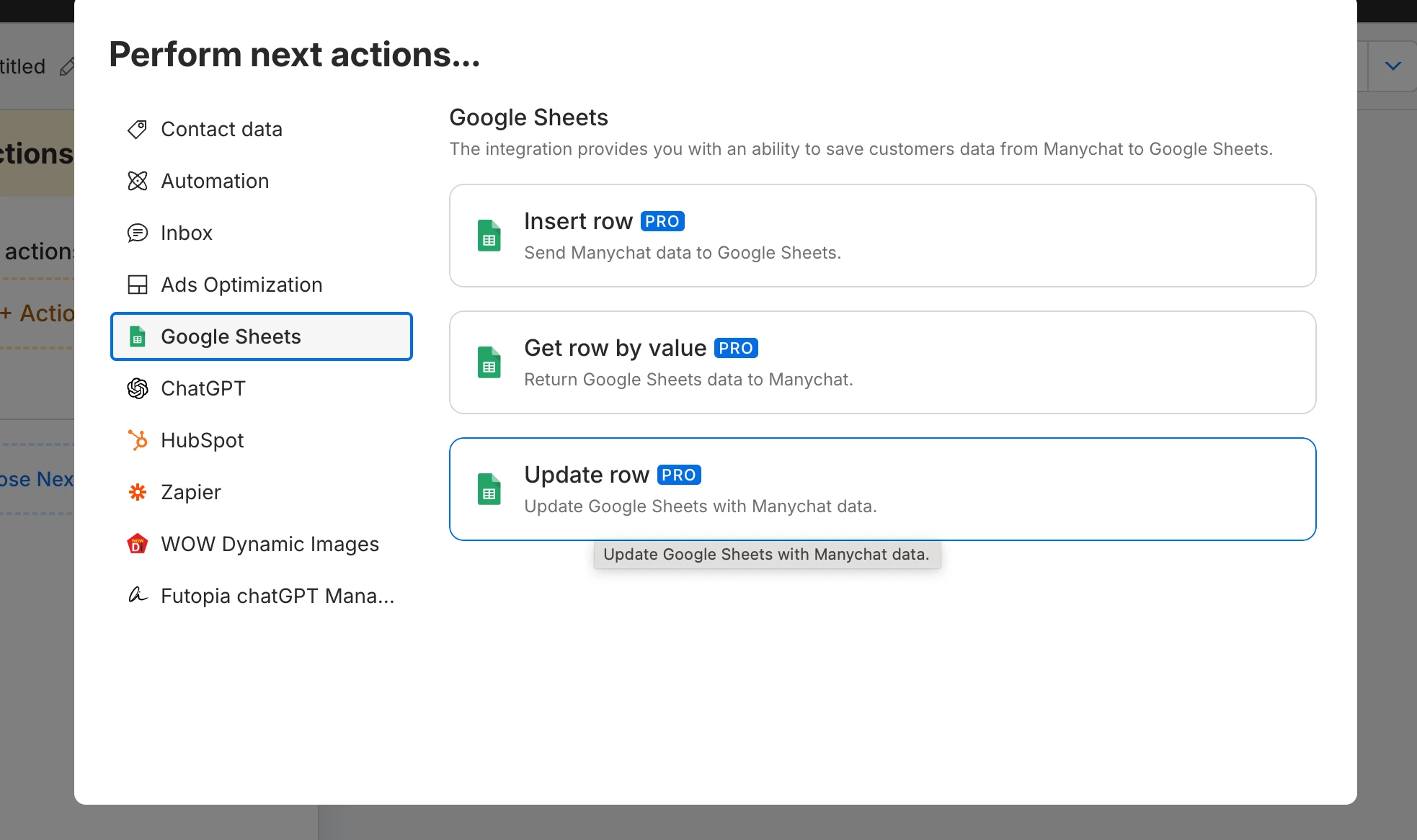
Yes, you can definitely do this using the Action → Update Row in ManyChat.

My recommendation is to always include the ManyChat User ID in the first column of your Google Sheet. This way, every time you need to update a row for the same user, ManyChat can correctly identify and update the existing row instead of creating a new one.

Hope that helps!

Catalina Rendon


5 replies

cata_rendon
Forum|alt.badge.img+5
  • Community Moderator
  • Answer
  • April 27, 2026

Hi ​@Marius kure

Yes, you can definitely do this using the Action → Update Row in ManyChat.

My recommendation is to always include the ManyChat User ID in the first column of your Google Sheet. This way, every time you need to update a row for the same user, ManyChat can correctly identify and update the existing row instead of creating a new one.

Hope that helps!

Catalina Rendon


Marius kure
  • Author
  • Up-and-comer
  • April 28, 2026

Thank you for your reply.

Right now, I have set it up like this:

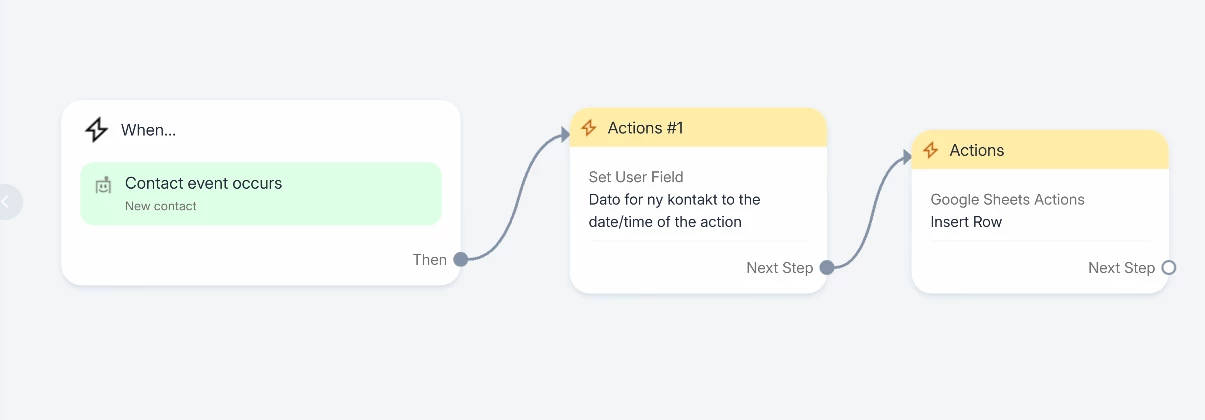
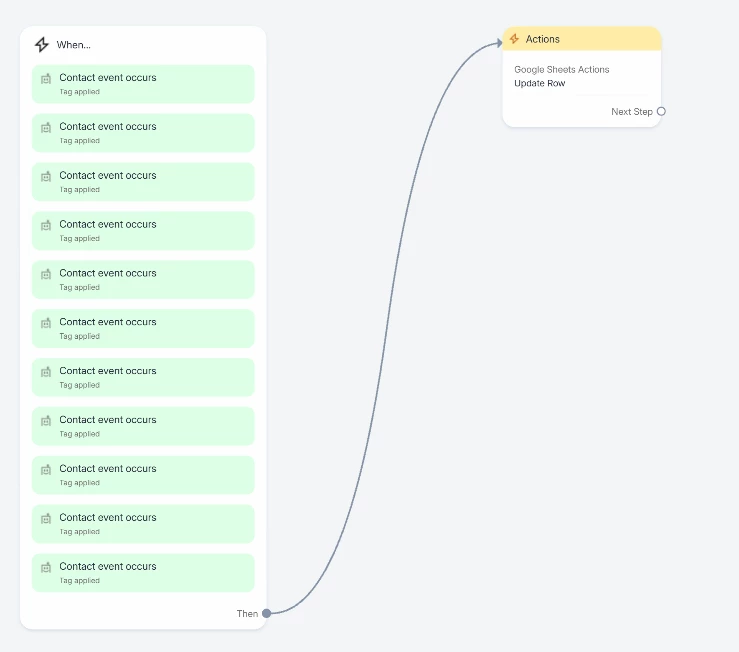
One flow with Insert Row to add all new contacts to the document, and one flow with Update Row to update the document every time a tag is added.

Is this set up correctly?

Is there a way for me to check whether it is set up correctly? When I go into a contact and test it, it does not always work. Could this be a delay in the system, or are there other possible explanations?

Or is it because I should create a flow with Update Row every time a tag is removed? It seems to work fine without that, except for the issue mentioned above.

I am a bit nervous that I might find out in a month that it was set up incorrectly, and by then I may have 1,000 contacts, which would make it difficult to check whether everything is correct.

I hope you can help! 🙏


cata_rendon
Forum|alt.badge.img+5
  • Community Moderator
  • April 28, 2026

Hi ​@Marius kure,

You can actually use Update Row all the time—it’s simpler and works well (that’s what I personally do).

To test it, you can use your own user: just interact with your bot and trigger the flows that include the Update Row action. That way, you can verify if the data is being updated correctly in your sheet.

One thing to keep in mind: sometimes you may run into issues like duplicate rows for the same user. This often happens when the User ID is very long and Google Sheets automatically converts it into scientific notation. To avoid this, make sure the column format in your sheet is set correctly (e.g., plain text).

Also, I recommend keeping the Update Row action consistent across your flows—always updating the same fields instead of doing it step by step. This helps ensure that even if something goes wrong and the data doesn’t land in the same row, you can still capture the full, most recent set of information in the latest record.

Hope this helps!

Cheers

Catalina Rendon


Marius kure
  • Author
  • Up-and-comer
  • April 29, 2026

Okay, that sounds good.


So I don’t actually need a trigger on the Update Row — it will automatically update when I add or remove tags on a contact?


Thanks again for the help, I’ve spent way too many hours on this.


cata_rendon
Forum|alt.badge.img+5
  • Community Moderator
  • April 29, 2026

Okay, that sounds good.


So I don’t actually need a trigger on the Update Row — it will automatically update when I add or remove tags on a contact?


Thanks again for the help, I’ve spent way too many hours on this.

In order for Update Row to trigger, you need to set up a rule base on a Tag or any action you prefer. Or you need to include the action step within your flows.