Solved

I have been struggling to get the flow to work

  • January 15, 2026
  • 4 replies
  • 50 views

Charles

Hi guys been trying to do this for  3 days now: any help appriaciated: 

Goal

  • Collect email via Instagram DM

  • Validate email with NeverBounce

  • Allow max 3 invalid attempts

  • On 4th invalid email, send fallback message (form link)

  • Never send ebook unless email is valid

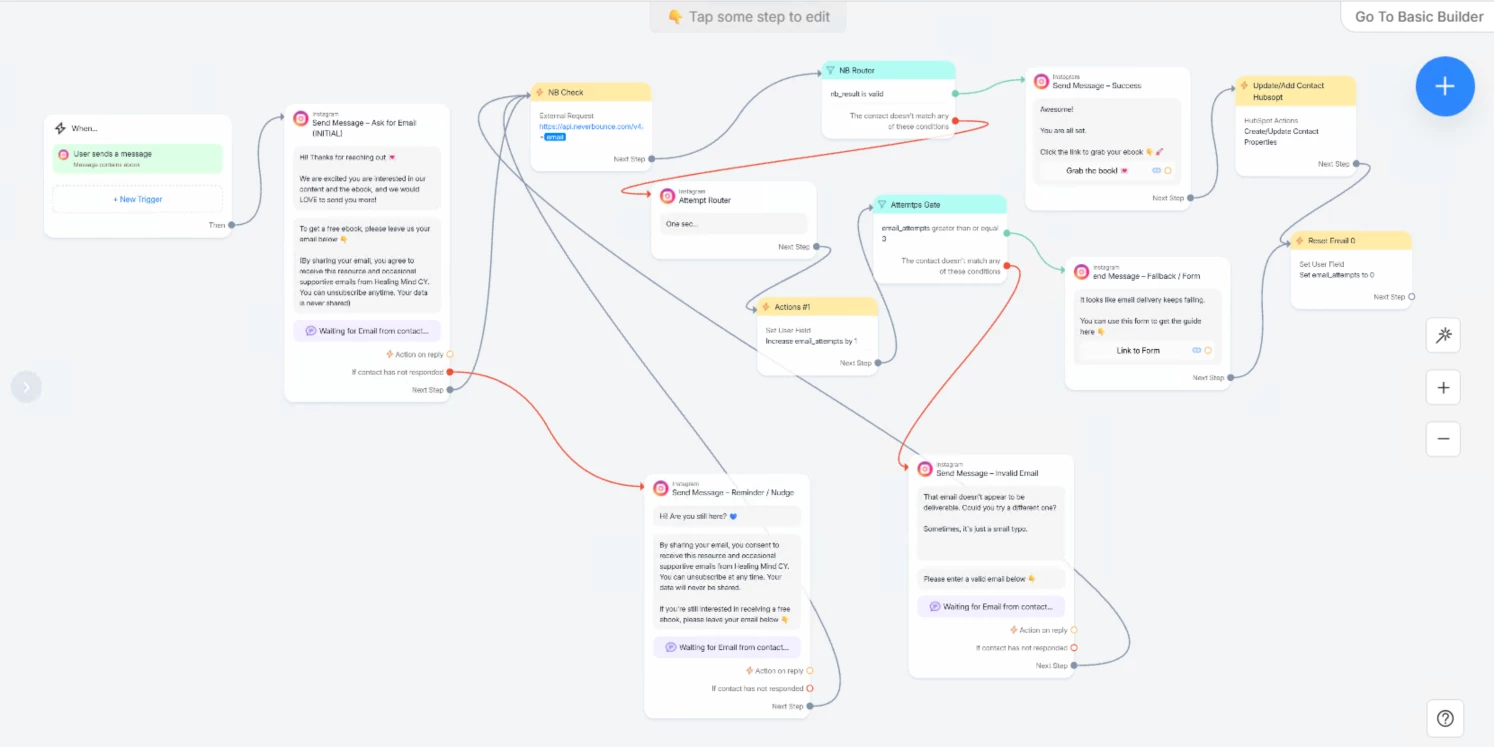
Current Flow Logic

  • User triggers automation by messaging “ebook”

  • Bot asks for email

  • Email is checked via NeverBounce (External Request)

  • Router checks:

    • nb_result is validSuccess message + ebook

    • Otherwise → invalid path

  • Invalid path:

    • Increment email_attempts by +1

    • Ask user to re-enter email

    • Gate checks email_attempts ≥ 3

      • Yes → fallback message

      • No → retry loop

Problem

  • On the 4th invalid email submission, the flow still routes to Success

  • Ebook is sent even though NeverBounce result is not valid

  • NeverBounce action itself works correctly

  • Attempts counter is incrementing, but routing is failing

Key Constraint

  • ManyChat standalone Actions cannot be routed

  • Actions inside message blocks can’t be read by routers

  • Current workaround uses:

    • “Attempt Router” message Actions  to increment attempts.

Question

  • How do I reliably block the Success path when:

    • nb_result ≠ valid

    • AND email_attempts ≥ 3

  • What is the correct pattern in ManyChat to:

    • Increment attempts

    • Evaluate attempts

    • Prevent Success from ever firing on invalid/catch-all results?

Any working reference flow or confirmed pattern would be appreciated.


Best answer by cata_rendon

Hi ​@Charles ,

From what I can see, it looks like the main issue may be related to how the JSON response from your External Request is being saved into Custom User Fields (CUFs).

Right now, it’s not fully clear (at least from the screenshots) which CUF you are saving the JSONPad / NeverBounce response into, or how that value is later evaluated in your routers. If the response isn’t being stored correctly (or is being overwritten), the router conditions may never evaluate as expected.

A couple of important things to keep in mind:

  1. Clear CUFs at the start of the flow when testing
    When you test the same flow multiple times, it’s best practice to add an initial step that clears or resets the relevant CUFs (email result, attempts counter, etc.). Otherwise, previous values can interfere with your conditions and make the routing look inconsistent.

  2. About the “fourth attempt”
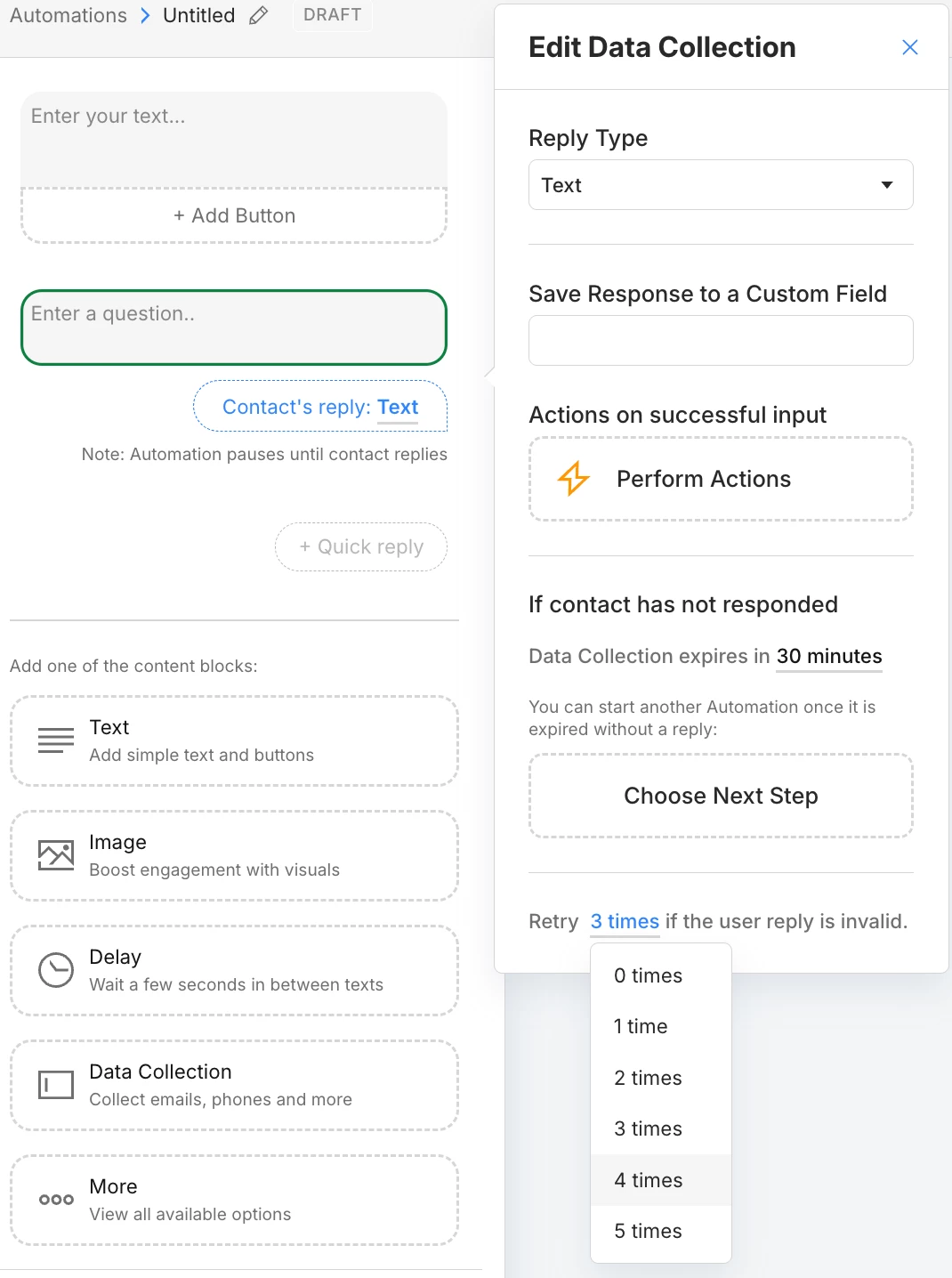
    I’m not entirely sure what you mean by the fourth email attempt in your flow. Are you referring to the Data Collection setting:
    “Retry X times if the user reply is invalid”
    ?

    If that’s the case, I’d recommend this pattern:

    • First, let the Data Collection step validate and confirm that the email is actually saved correctly in ManyChat.

    • After that, use a conditional step (router) to verify that the email exists and is properly formatted.

    • Only then send the External Request to your verification service (NeverBounce or your app) to evaluate deliverability.

This separation usually makes the logic much more reliable and avoids Success paths firing when they shouldn’t.

Hope this helps clarify the issue 
.

Best,
Cata Rendón


4 replies

Gustavo Boregio
Forum|alt.badge.img+7
  • Manychat Community Moderator & Expert
  • January 15, 2026

@Charles try adding a 10 seconds smart delay between the Action to increment the counter and the condition that checks it.

While debugging, also add a message there that shows you the counter’s value so you know it’s working correctly.

Let me know how that goes ;)


cata_rendon
Forum|alt.badge.img+4
  • Manychat Community Moderator
  • Answer
  • January 15, 2026

Hi ​@Charles ,

From what I can see, it looks like the main issue may be related to how the JSON response from your External Request is being saved into Custom User Fields (CUFs).

Right now, it’s not fully clear (at least from the screenshots) which CUF you are saving the JSONPad / NeverBounce response into, or how that value is later evaluated in your routers. If the response isn’t being stored correctly (or is being overwritten), the router conditions may never evaluate as expected.

A couple of important things to keep in mind:

  1. Clear CUFs at the start of the flow when testing
    When you test the same flow multiple times, it’s best practice to add an initial step that clears or resets the relevant CUFs (email result, attempts counter, etc.). Otherwise, previous values can interfere with your conditions and make the routing look inconsistent.

  2. About the “fourth attempt”
    I’m not entirely sure what you mean by the fourth email attempt in your flow. Are you referring to the Data Collection setting:
    “Retry X times if the user reply is invalid”
    ?

    If that’s the case, I’d recommend this pattern:

    • First, let the Data Collection step validate and confirm that the email is actually saved correctly in ManyChat.

    • After that, use a conditional step (router) to verify that the email exists and is properly formatted.

    • Only then send the External Request to your verification service (NeverBounce or your app) to evaluate deliverability.

This separation usually makes the logic much more reliable and avoids Success paths firing when they shouldn’t.

Hope this helps clarify the issue 
.

Best,
Cata Rendón


Charles
  • Author
  • Up-and-Comer
  • January 15, 2026

Thank you all so much—this was great help and led me to check the data collection blocks. I disabled the retry attempts by setting them to 0, and the entire flow is now working as expected.

The next step is to fix the HubSpot block so the email is sent correctly 🙂

Finally making some progress—thank you again!


cata_rendon
Forum|alt.badge.img+4
  • Manychat Community Moderator
  • January 16, 2026

Thank you all so much—this was great help and led me to check the data collection blocks. I disabled the retry attempts by setting them to 0, and the entire flow is now working as expected.

The next step is to fix the HubSpot block so the email is sent correctly 🙂

Finally making some progress—thank you again!

Good! I am glad it worked!