Why does the auto-message to follower feature use a different font and require a button at the bottom?
It doesn't look like a natural message, and because it appears automated, the response rates(double tap like) are quite low.
I usually send these messages manually myself. It takes a bit more effort, but the response rate is much higher. While this new feature saves some time, it makes the greeting feel less personal and less like it was sent by a real person.
Is it possible for us to change these?
For example, can we at least have an option to remove the button at the bottom. Otherwise, it looks exactly like an automated system message and comes across as really insincere.
Best answer by Fabio Gaulke
Hi, @MRPP!
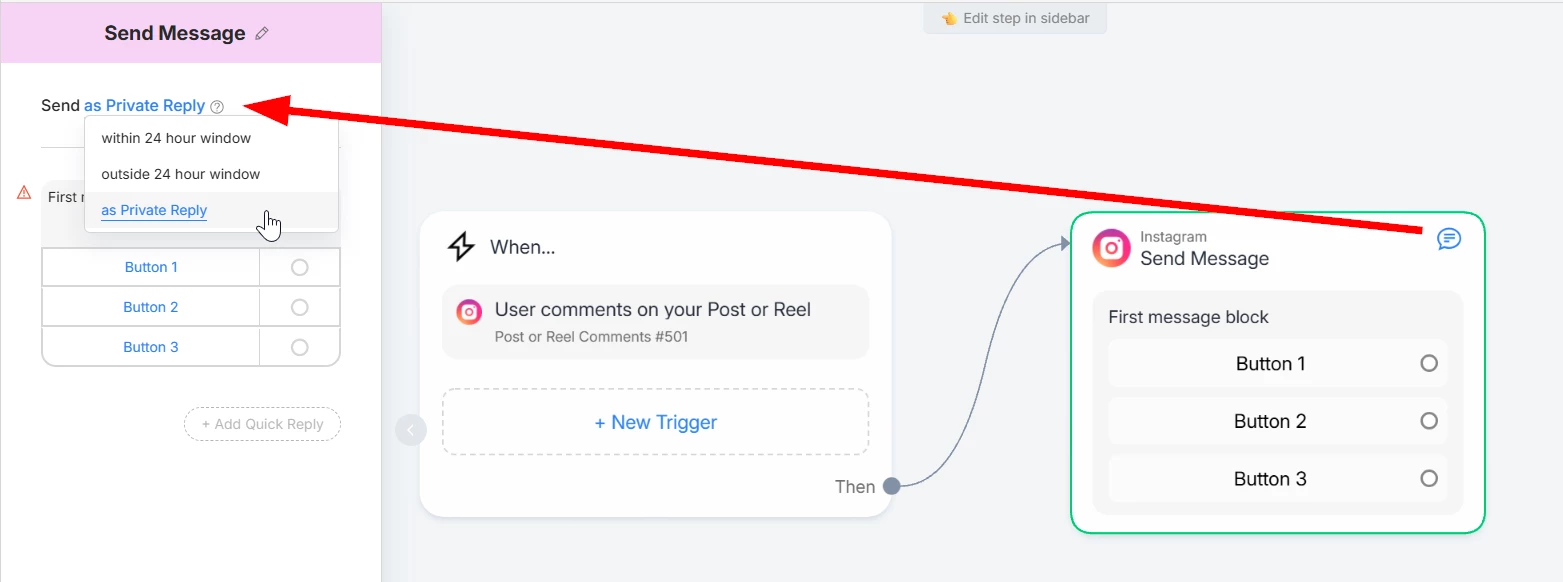
You can customize this message in many ways if you build it with the classic flow builder and set it as the reply to new followers…
IMPORTANT: You need to set the first message block as Private Reply to work with this trigger.
There are 2 ways to do that:
Insert a temporary Post Comment trigger to be able to change it
Or build the automation, set it as reply to new followers and go back to it to change the first block as Private Reply.
This way you can set your message WITH or WITHOUT buttons 😉
PS: If you already created an automation using the “quick method”, there are two ways to get to the Flow Builder:
No worries. I tried it out earlier, and to make those changes, I had to upgrade to a paid account. I have already upgraded now, but I've noticed an issue.
It seems that the auto-DM isn't sending to everyone who follows me. Some accounts follow me, but the message isn't being triggered or sent.
No worries. I tried it out earlier, and to make those changes, I had to upgrade to a paid account. I have already upgraded now, but I've noticed an issue.
It seems that the auto-DM isn't sending to everyone who follows me. Some accounts follow me, but the message isn't being triggered or sent.
What would be the reason for this?
Super!
That's something known… not all new followers get the message. Seems some kind of "control” from Meta's side.
Also, if an account followed you before, it also won't trigger if it unfollows and follows again.
I am not sure what the cause is, but this has been happening quite frequently lately.
Previously, regardless of whether the person I followed had their private messages open, the messages would always send. Even if I visited their profile and there was no "message" button available, they could still be sent out.
However, recently many accounts look like I should be able to message them directly, but the messages are not being sent automatically.