
Question

Comment to DM not working at ALL

  • July 7, 2026
  • 3 comments
  • 17 views

josip856
Forum|alt.badge.img

Hi,

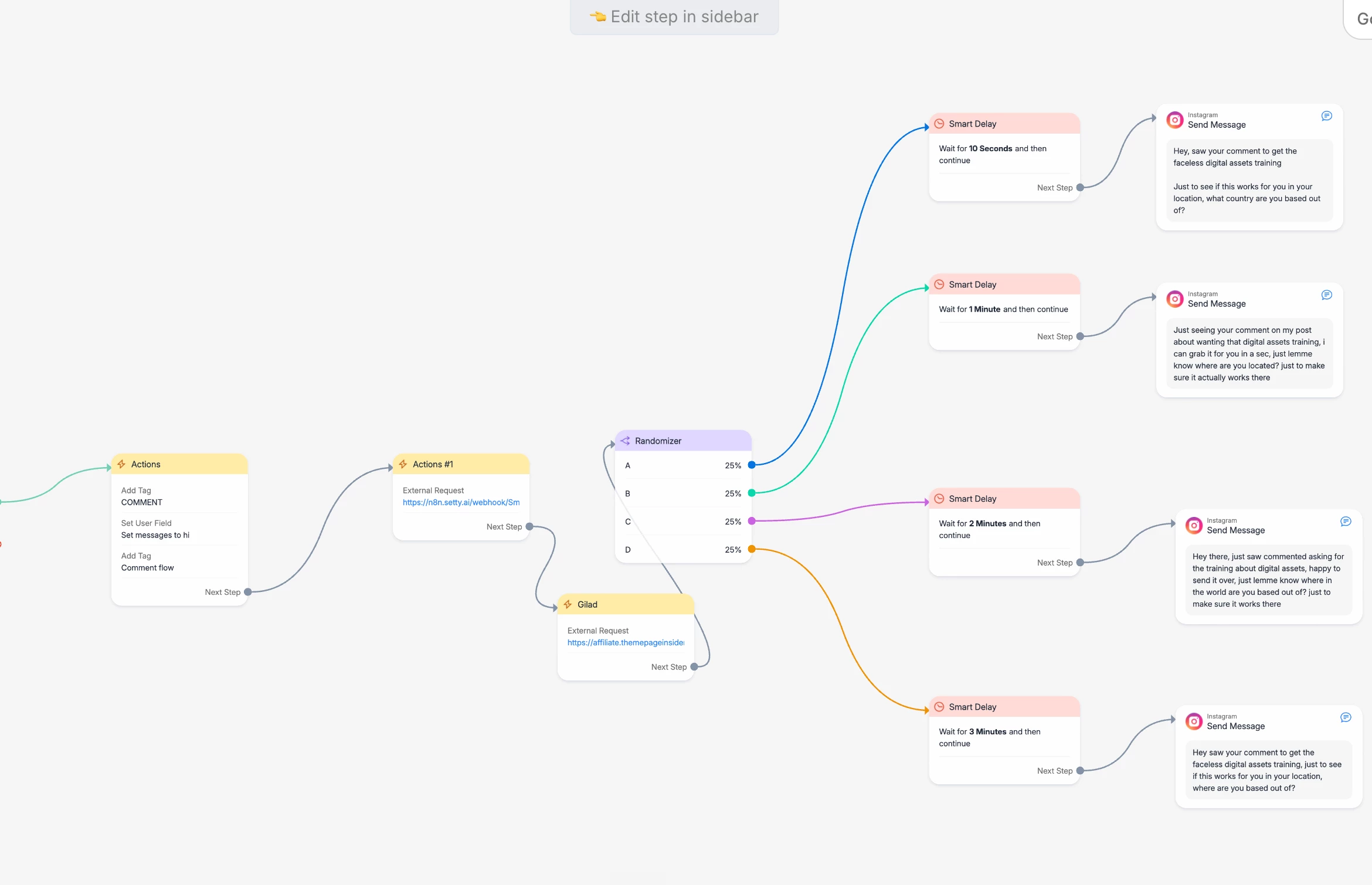
Comment to DM automation is almost not working at all on my account
I have tried resetting permissions and doing a hard refresh of the connection in MBS, (as instructed by the automated support) but still nothing.
And also just to clarify:

  • Send a message is set to “Private Reply”
  • permissions are refreshed
  • It works on SOME accounts


3 replies

CAZ
  • Up-and-comer
  • July 7, 2026

FACEBOOK COMMENT TRIGGER NOT FIRING - Everything connected but 0 sends

Just joined, asked MC for support but nothing. I’m hoping someone can help because I’ve been troubleshooting this with chatgpt for several days adn I’m completely stuck. I have a feacebook comment automation set up in Macy Chat. This automation is LIVE, the correct FB page and post are selected, and the keyword is CARD. I have checked the following:


ManyChat is active in FB business integrations.

The correct FB page is selected for MC.

Page comment, content and Messenger permissions are switched on.

The Page connection has been successfully reloaded in MC.

The automation and trigger are LIVE.

Comments are being made as brand-new top level comments from a different genuine FB account.


My original automation remained at 0 sends, so today I crated a completely frest test:


New fb post, new automation from scratch, new comment trigger, simple Messenger message, set lIVE, fresh CARD comment from another account. The resutl is still 0 send and 0 contacts.


This seems to suggest that MC is not receiving the FB commentevent at all, rather than there being a problem with the automation flow itself.


Has anyone experienced this exact issue? Is there another page-level permission, webhook, comment event subscription, or FB/MC connection issue that I shoudl check?


I’d be very grateful for any help, but please note that I’ve already rebuilt the automation, refreshed the connection and checked the standard FB permsissions.


Thank you


SumGenius
Forum|alt.badge.img
  • Smooth talker
  • July 7, 2026

Worth separating these two, because they look similar but have different root causes.

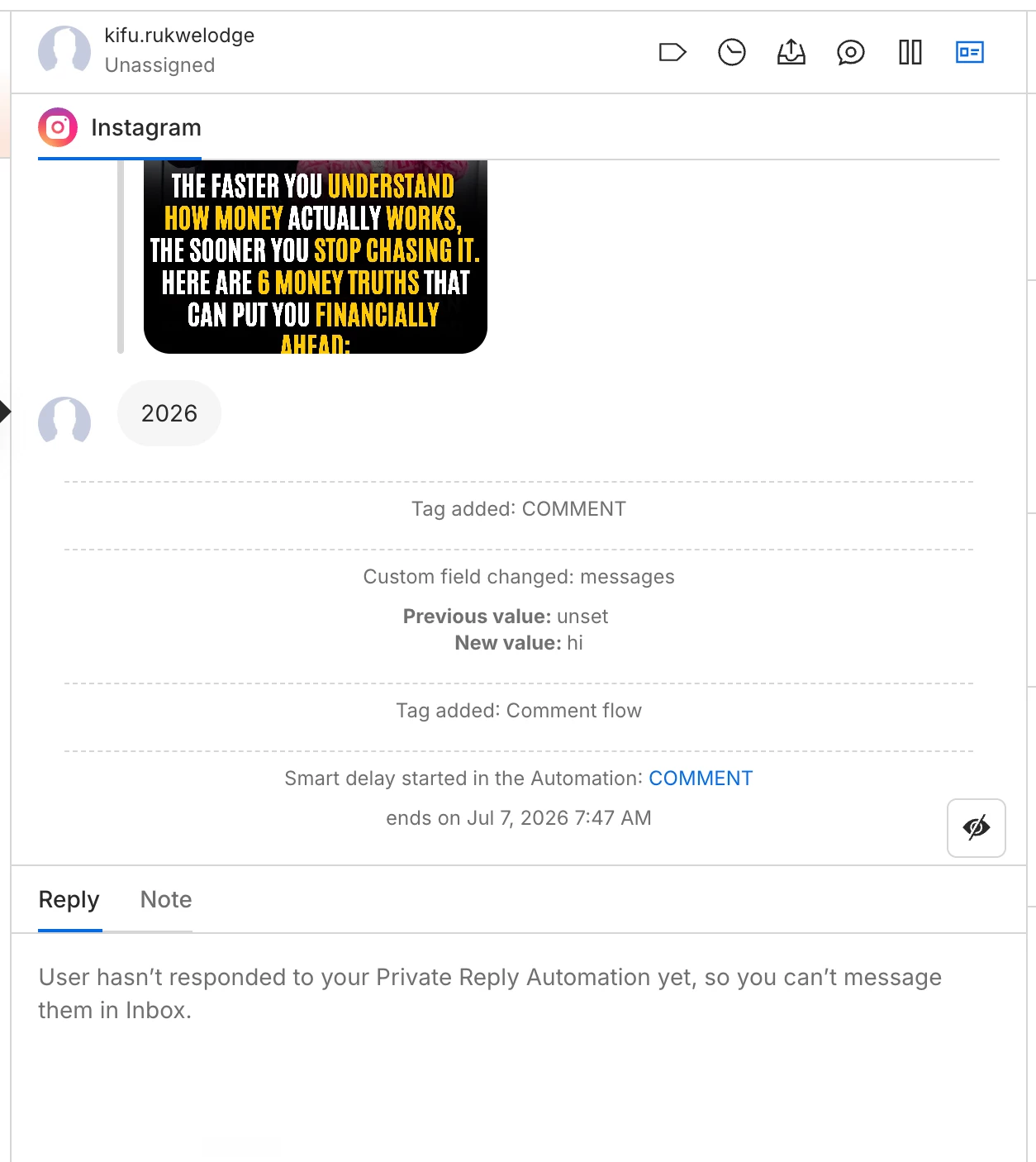
@josip856 yours is actually the good case: your flow IS firing. The "Tag added: COMMENT", the custom field change, and "Smart delay started" all confirm the comment event came in and the automation ran. The blocker is that last line: "User hasn't responded to your Private Reply Automation yet, so you can't message them in Inbox."

The Meta rule behind it: replying to a comment sends a private reply, and Meta only allows ONE per comment. A comment does not open a 24h window, and if the person doesn't follow you it lands in their message requests folder, not their main inbox. Until they reply to that first message, you can't send anything else, so your randomizer branches with the 10s / 1m / 2m / 3m follow-ups are all blocked. Only the first send is ever eligible.

The fix, and this part matters: make that first message a plain, no-link nudge that gets them to reply (something like "reply YES and I'll send it over"). Do NOT put your link in that first message. A link in the first private reply pushes it toward the requests/spam folder and kills delivery. Once they reply, the window opens and THEN you send the link in the follow-up. So the order is reply-getter first, link second.


@CAZ yours is a different animal. 0 sends AND 0 contacts means the comment event never reached the tool at all, so it's not your automation or your keyword, it's the Page connection upstream. For Facebook, comment triggers depend on the Page's feed webhook subscription being active, and that can silently drop while everything still shows connected. A soft reload usually doesn't re-subscribe it. What tends to fix it: go to the Page's Business Settings > Integrations / Connected Tools on Meta's side, fully remove the tool, then reconnect from scratch. Also worth confirming the admin who connected it has full page access, not limited, since partial access can leave Messenger working but comments not firing.

Quick test, CAZ: comment the keyword yourself and watch the Contacts count. If it never moves, it's event delivery at the connection, not your flow.


Happy to dig into either setup if you DM me, I've chased both of these down before.


CAZ
  • Up-and-comer
  • July 8, 2026

Worth separating these two, because they look similar but have different root causes.

@josip856 yours is actually the good case: your flow IS firing. The "Tag added: COMMENT", the custom field change, and "Smart delay started" all confirm the comment event came in and the automation ran. The blocker is that last line: "User hasn't responded to your Private Reply Automation yet, so you can't message them in Inbox."

The Meta rule behind it: replying to a comment sends a private reply, and Meta only allows ONE per comment. A comment does not open a 24h window, and if the person doesn't follow you it lands in their message requests folder, not their main inbox. Until they reply to that first message, you can't send anything else, so your randomizer branches with the 10s / 1m / 2m / 3m follow-ups are all blocked. Only the first send is ever eligible.

The fix, and this part matters: make that first message a plain, no-link nudge that gets them to reply (something like "reply YES and I'll send it over"). Do NOT put your link in that first message. A link in the first private reply pushes it toward the requests/spam folder and kills delivery. Once they reply, the window opens and THEN you send the link in the follow-up. So the order is reply-getter first, link second.


@CAZ yours is a different animal. 0 sends AND 0 contacts means the comment event never reached the tool at all, so it's not your automation or your keyword, it's the Page connection upstream. For Facebook, comment triggers depend on the Page's feed webhook subscription being active, and that can silently drop while everything still shows connected. A soft reload usually doesn't re-subscribe it. What tends to fix it: go to the Page's Business Settings > Integrations / Connected Tools on Meta's side, fully remove the tool, then reconnect from scratch. Also worth confirming the admin who connected it has full page access, not limited, since partial access can leave Messenger working but comments not firing.

Quick test, CAZ: comment the keyword yourself and watch the Contacts count. If it never moves, it's event delivery at the connection, not your flow.


Happy to dig into either setup if you DM me, I've chased both of these down before.

Thanks for this information SumGenius. I will have a try out and let you know.