Yes.. I’m very new.. I’m just not getting the step even with chatgpt.. its almost as if there was an update and all the vidoes I’ve seen do not look like the screen I have. Join a video call would be great. Here is a link to set up a call with me. https://tinyurl.com/4eumt3xp
yes, the screen looks a bit different.. you’re URL is not working. Send me a message to whatsapp +55 15997041806 or an email to mateusnvideos@gmail.com so we can set up a meeting.
Hi @Itskev, welcome to Manychat! Don't worry, it's not as complicated as it looks. Let me give you a few tips.
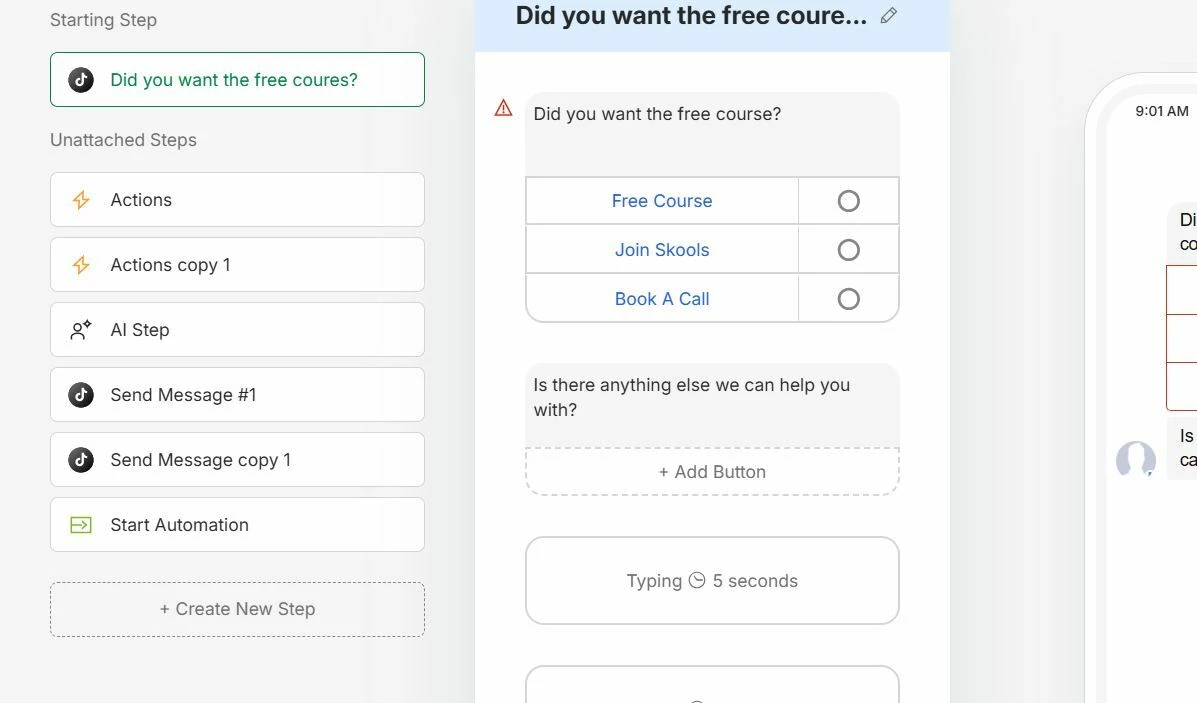
1. Don't stack two separate messages in the same step. Right now you seem to have "Did you want the free course?" and "Is there anything else we can help you with?" living in the same block. Treat each one as its own message/step. Decide what the first message is (the one with the buttons), and let the follow-up message come later in the flow — not bundled together.
2. Connect each button to its own next step. This is the key part. Each button ("Free Course", "Join Skool", "Book A Call") needs to be linked to what happens after the user taps it. In Manychat, you do this by clicking the button and connecting it (the little circle on the right of each button) to a new step — that's where you put the message, action, or automation that should fire for that specific choice.
So the structure looks like:
Message 1: "Did you want the free course?" → 3 buttons
"Free Course" → step that delivers the course
"Join Skool" → step with the Skool link
"Book A Call" → step that triggers your booking flow
The "Is there anything else…" message comes after, as a separate step.
Once each button points somewhere, the "next step" confusion goes away — the flow just follows whatever the user picks.
Hope that helps!
Happy to look closer if you share a screenshot of the connections.