


Question

Confusing whatsapp messages; 24 windows, none-24 hours messages, utiltiy message and normal message

  • April 24, 2026
  • 1 comment
  • 9 views

sota
Forum|alt.badge.img

I got confused on the whatsapp messages types, seems we have:-

1- 24 hour message

2- more than 24 hours message

3- normal messages

4- utility approved messages


so can anyone help me in understanding those?


in my case, i send a 24-hours windows whatsapp message to the user yesterday morning, now i got this message inside manychat UI:-
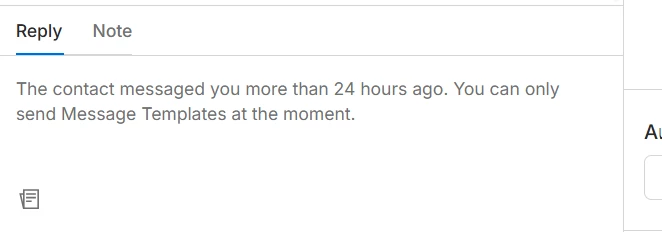


so how i can avoid this? using utility messages? and if utility messages is the way to allow us to reply after 24-hours, are those offered for free ?


second point, now using  whatsapp business application, i can still reply to the above user even after 24 hours… so is the 24-hours limited inside manychat’s Inbox UI only?

1 reply

SumGeniusAI
Forum|alt.badge.img
  • Smooth talker
  • April 24, 2026

Key thing to understand: the 24-hour window resets when the customer sends you a message, not when you send one. If the last message was from you and they haven't replied  since, the window is closed until they message you again.

Breaking down your 4 types:

1. 24hr message = any free-form message, only allowed within 24hrs of the customer's last message

2. >24hr message = window closed, you can only send pre-approved Message Templates (utility, marketing, or authentication categories)

3. Utility templates are NOT free — Meta charges per message/conversation, rates vary by country and template type. 

4. The reason the regular WhatsApp Business app works for you after 24hrs: it's not using the API. Any tool using the WhatsApp Business API (ManyChat) has to follow Meta's 24-hour rule. The consumer Business app uses a different infrastructure without those restrictions.

If you need to message regularly outside the 24hr window, you'll need pre-approved Utility Message Templates for your use cases (order updates, appointment reminders, etc).
