Hi @j.sandra this is a bit tricky. If you have multiple organic posts using the same keyword, you won’t be able to reliably identify which post the comment came from.
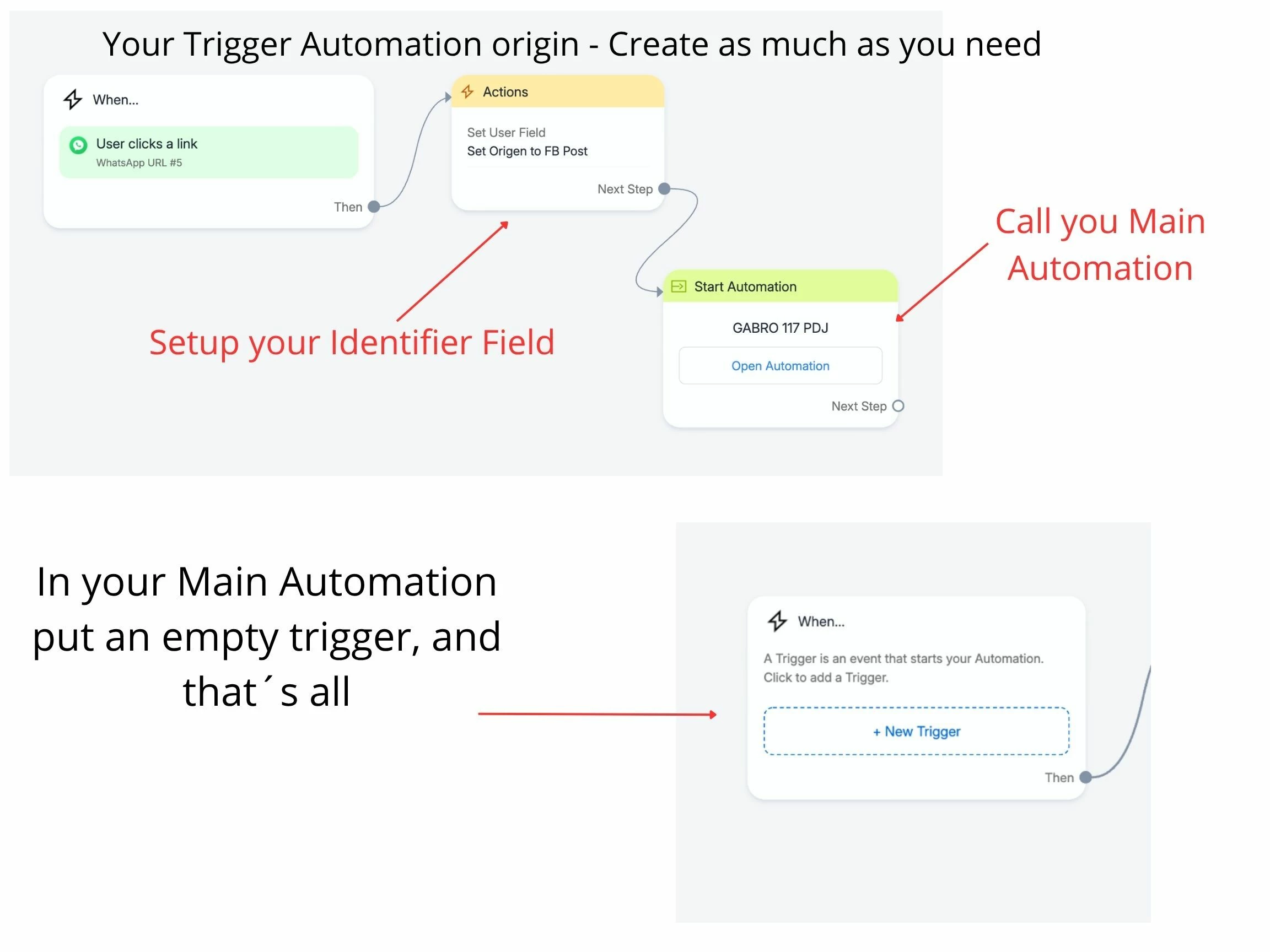
The best alternative is to use a different keyword for each post and set up a small “pre-flow” that captures the keyword before sending the user to your main flow. This way, the keyword itself becomes your source tracker.
Also, keep your keywords specific and avoid overlaps so each one is clearly tied to a single post.
Then, you can store that keyword in the user profile (using tags or custom user fields) to track the lead’s journey.
Thanks, but not my case, cause I set trigger for comments on all posts, so I need to detect origin of the comment.
Very strange ManyChat missing this info, Meta sends on trigger.
It’s so distressful have no origin from trigger, it’s important for insights.
I understand your frustration, that is why my advice is to use a different trigger “key word” for each post and then use a pre flow to tag or register in a CUF the source of the lead.
Ok, I hope this can help you, you need to create a separate Automation with the Trigger you use and also you can set a Field for example Origin with the value you want set for origin, this automation Call the main Automation you use, you can make several Small Trigger Automation who calls and setup the Field to control where it comes the trigger, this small triggers you need to create one for each source you need to identify, depending where you are using it.