Question

Do I Need Separate ManyChat Automations for Identical Facebook and Instagram Posts?

  • May 26, 2026
  • 1 comment
  • 7 views

lisablake

Just confirming I’m understanding this correctly before I build this workflow out:

If I’m posting the exact same video with the same caption and the same comment keyword on both Instagram and Facebook, do I need to manually create/post them separately and set up the automation separately for each platform?

Example:

Instagram post: “Comment RACHEL and I’ll send the link.”
Facebook post: “Comment RACHEL and I’ll send the link.”

Am I correct that ManyChat can automate the comment-to-DM part on each platform, but it does not publish the Instagram post and automatically cross-post/share it to Facebook while keeping the same automation attached?

Basically, I’m trying to confirm whether there’s any way to:

Post once → have it appear on both IG + FB → same keyword works on both → ManyChat sends the correct DM/link on both platforms

Or if the correct workflow is:

Post manually to Instagram → connect IG automation
Post manually to Facebook → connect FB automation separately

Just want to make sure I’m not missing a shortcut before I start doing this every time.
1 reply

Fabio Gaulke
Forum|alt.badge.img+3
  • Community Moderator
  • May 26, 2026

Hello, ​@lisablake 


You are completely correct in your understanding. You do need a separate automation for each channel because Instagram and Facebook operate as distinct platforms within Manychat. Cross-posting a video from Instagram to Facebook will not automatically carry the automation over to the Facebook post.


However, you don't have to manually recreate the entire workflow from scratch. Here is a quick shortcut you can use to save time:

  1. Build out your complete automation for Instagram first.

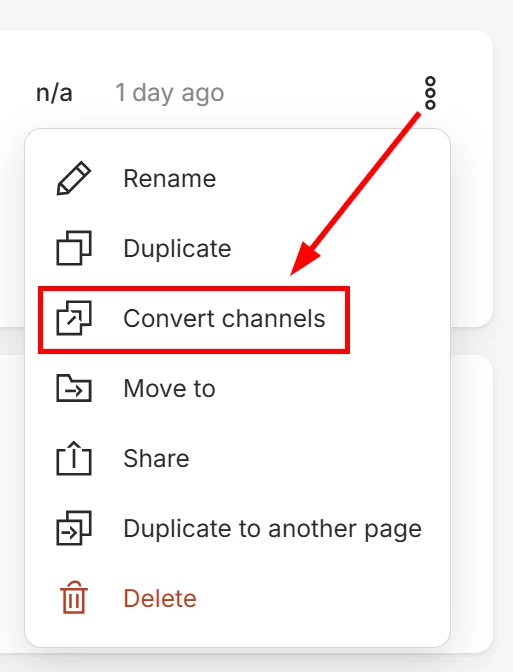
  2. Go back to the automation list and click the three dots that appear when you hover the automation and select Convert Channels.


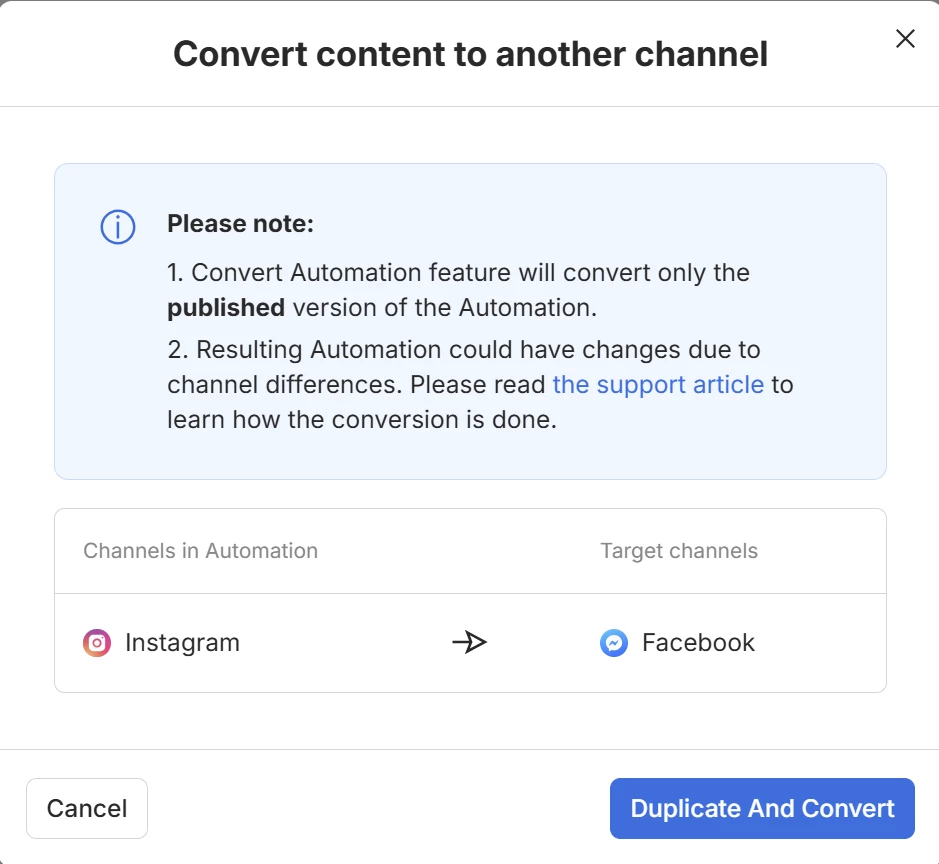
  3. Choose Facebook as your target channel and click Duplicate and Convert.


This will automatically create a copy of your flow adapted for Facebook. The only thing you will need to do afterwards is manually add the Facebook Comment trigger to this new flow, as triggers are automatically removed during the channel conversion process to let you specify the new setup.


Hope this helps! 🙌