Solved

Get Row to Conditional Block

  • August 23, 2025
  • 5 replies
  • 27 views

Yahya

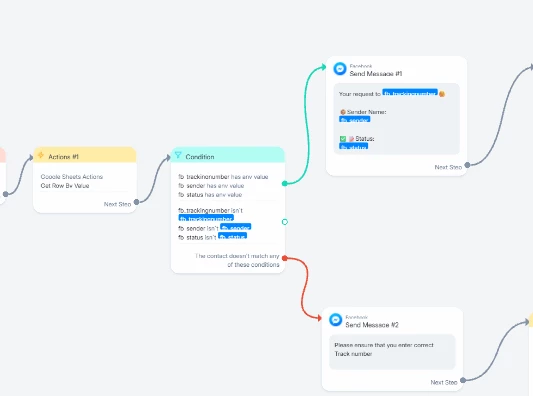
Hi there hopefully some one help me for this… When I test it like inputting wrong info and it still going to message #1 but off course the custom field is empty because the last input text is not match in the data... which is supposed to be will go to my message 2 that the data is not much…

Thanks in advance more power to you all...

Best answer by Yahya

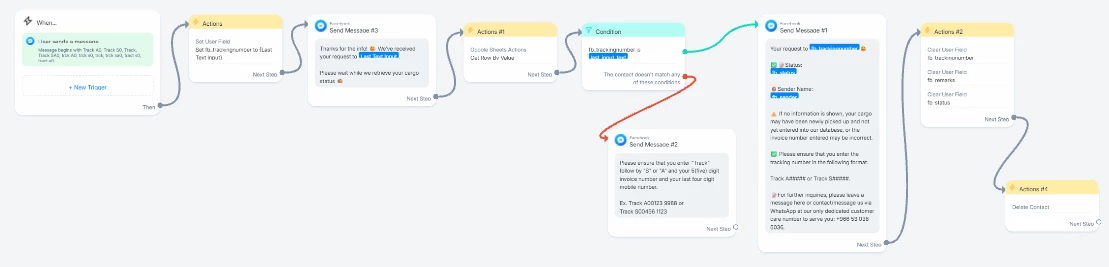
@Gustavo Boregio Thanks… actually my mapping is correct because fetching the information using the get row action is working only my conditional block not working…. but thanks I already figure it out and it’s now working properly sending to message #1 and #2 as per condition block


Thanks again and more power...


5 replies

Gustavo Boregio
Forum|alt.badge.img+6
  • Manychat Community Moderator
  • August 23, 2025

Hey ​@Yahya you have to sort out your Google Sheet setup.

Are you searching by an ID? Is the ID unique? If the Google Sheet properly formatted?

Here's some documentation that may help you: https://help.manychat.com/hc/en-us/articles/14281248811292-Google-Sheets-integration


Yahya
  • Author
  • Up-and-Comer
  • August 23, 2025

Thanks for your reply here’s my header of google sheet


Gustavo Boregio
Forum|alt.badge.img+6
  • Manychat Community Moderator
  • August 24, 2025

@Yahya got it! And what's the Value you're using to search and connect Manychat and Google Sheet?


Yahya
  • Author
  • Up-and-Comer
  • Answer
  • August 24, 2025

@Gustavo Boregio Thanks… actually my mapping is correct because fetching the information using the get row action is working only my conditional block not working…. but thanks I already figure it out and it’s now working properly sending to message #1 and #2 as per condition block
Thanks again and more power...


Gustavo Boregio
Forum|alt.badge.img+6
  • Manychat Community Moderator
  • August 26, 2025

@Yahya glad to hear you figured it out! Cheers!