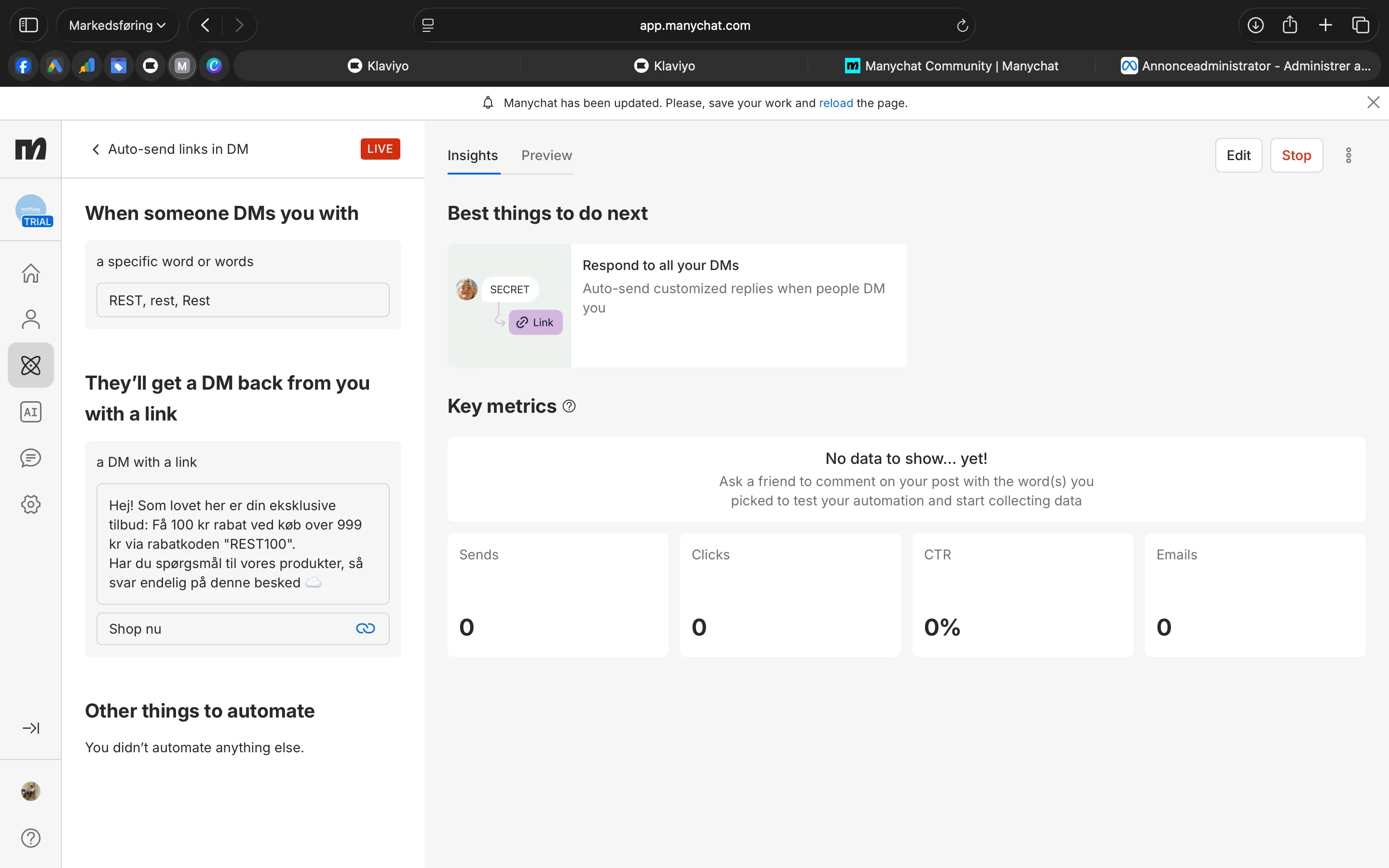
Hey Restflow, a few honest things to check, because 0 sends usually doesn't mean it's broken, it means nothing has triggered it yet:
1. This is a DM keyword trigger, so it only fires when someone actually sends your account a DM containing REST. The metrics show 0 because nobody has done that yet. First real test: from another account, DM the page the exact word REST and see if the reply fires.
2. You've got the "Manychat has been updated, please save and reload" banner at the top. Reload and re-publish so the live version is actually the current one. A pending update can leave it half-active.
3. Check your keyword match type. You have REST, rest, Rest listed. If it is set to exact match, the test DM has to be just that word with nothing extra. Switch it to "contains" if you want it to catch the word inside a sentence.
4. Make sure the IG/FB account is fully connected with messaging permission and is a Business or Creator account. If messaging access is not granted, DM auto-replies will not send. Refresh permissions as well sometimes that helps
One heads up: the "ask a friend to comment on your post" hint in that panel is for comment triggers, not this one. Yours is a DM trigger, so test it by DMing the keyword, not commenting.
My best guess is it's just untested plus that pending reload. Try the real DM test first.
If only this one fails and the rest work fine, the difference is the link button, and that's a known problem spot.
Two things:
1. Link buttons in IG DMs are flaky. They don't render at all on Instagram Desktop, and people report the message either not delivering or recipients not being able to open the button. Manychat's own recommended fix is to drop the button and put the link as plain text inside the message instead or put the link into a button of the 2nd message after their reply. So try this: remove the "Shop nu" button and write the link directly in the text, like "Få 100 kr rabat med koden REST100: https://yoursite.com". Then test again.
2. The URL has to be valid and properly formatted. If the link in that button has a typo, a missing https://, or a stray space, Manychat can fail the whole send. Double check it opens in a browser exactly as pasted.
Clean way to confirm: duplicate the automation, replace the whole reply with plain text "test" (no link, no button), and DM REST. If the plain version comes through and the link one doesn't, you've confirmed it's the link or button.
There's actually a thread on here titled "Auto-send links in DM not working" with the same template, so you are not alone on this. The plain-text link swap is the fix most people land on.