Question

Highly confused about Manychat AI

  • December 1, 2025
  • 7 replies
  • 54 views

SSTrey

I just subscribed to PRO with Manychat AI.
I went through all the steps (under Manychat AI section) to realise that this automatically setup my Insta instead of my Whatsapp.
How do I setup AI on the Whatsapp? I even went to Automation > New Automation but now I have more questions:
1.  What is the difference between ‘Automate conversations with AI’ & ‘Smart replies powered by AI’?
2.  What was the point of me going through all the steps under Manychat AI section? (when it seems I need to do a similar step again?

Rgds

Trey

7 replies

Gustavo Boregio
Forum|alt.badge.img+6
  • Manychat Community Moderator
  • December 2, 2025

@SSTrey the setup for Manychat AI for Instagram is more automated and with different features than Manychat AI for other channels.

For example, for WhatsApp, the options you have are mainly the ‘Intent Recognition’ and the ‘AI Step’ that you need to setup separately.

Here’s some more information about these features:

https://help.manychat.com/hc/en-us/sections/14281203243164-Manychat-AI

What exactly do you need to setup in your Manychat? What’s your business and how do you plan to use Manychat?


SSTrey
  • Author
  • Up-and-Comer
  • December 2, 2025

@SSTrey the setup for Manychat AI for Instagram is more automated and with different features than Manychat AI for other channels.

For example, for WhatsApp, the options you have are mainly the ‘Intent Recognition’ and the ‘AI Step’ that you need to setup separately.

Here’s some more information about these features:

https://help.manychat.com/hc/en-us/sections/14281203243164-Manychat-AI

What exactly do you need to setup in your Manychat? What’s your business and how do you plan to use Manychat?

@Gustavo Boregio  Really appreciate the speedy reply.
I have a client who owns an automotive car parts sales centre.  He has a website. His biggest problem is the number of potential client replies he receives both on his WhatsApp & Facebook page.  He cannot keep up with them.
I want to setup an AI Assistant for this purpose, so we can reduce & filter the replies and maybe filter through to him only when really necessary.  The AI must learn the website via the link and also possible learn further info I upload to it.

I will read through the link you shared to better understand ‘Manychat AI’
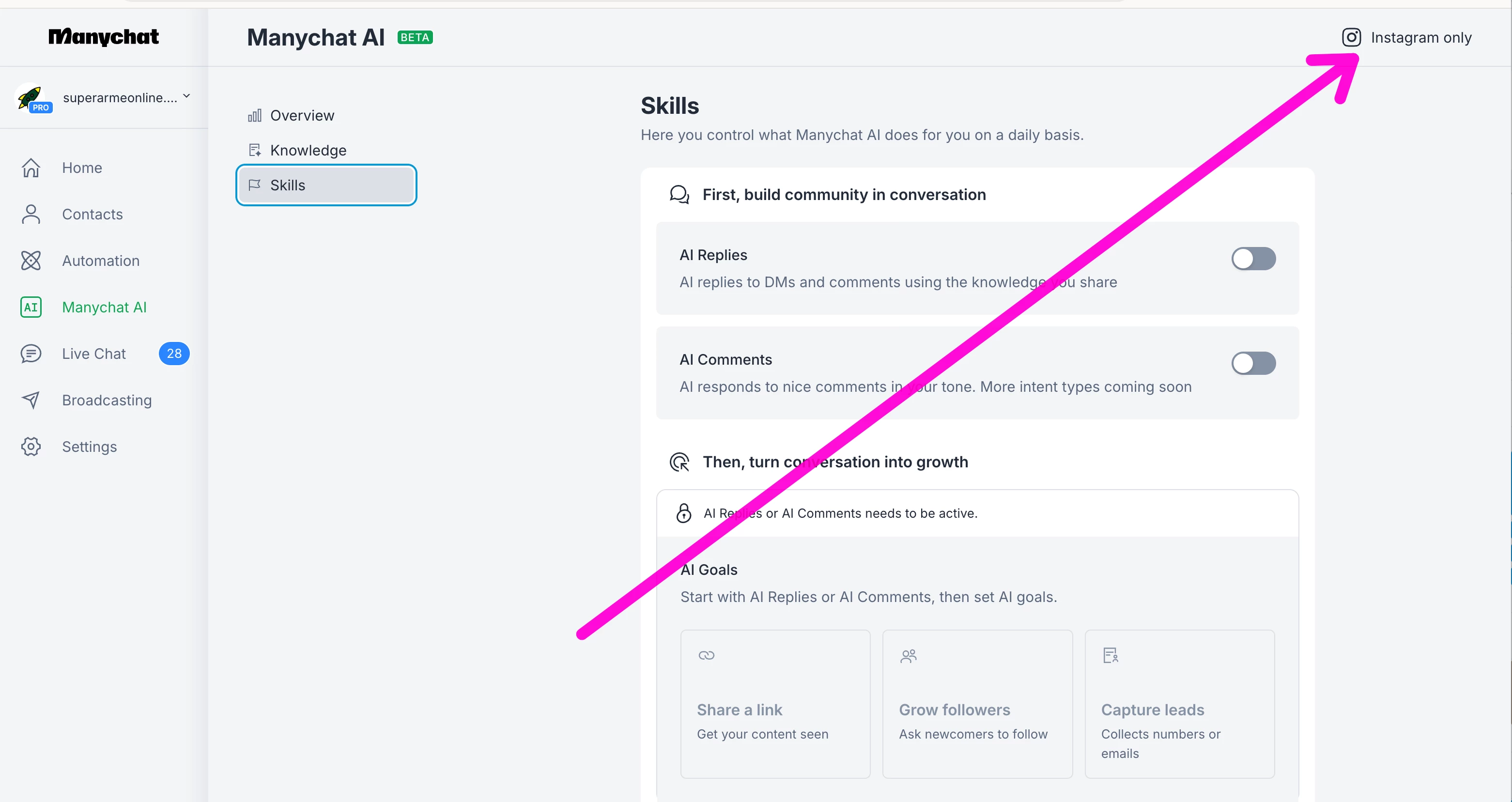
However I’m still unclear on what the ‘Manychat AI’ under the Workspace inside Manychat, actually does.  Is this only for Instagram?
Also, is the ‘Intent Recognition’ and ‘AI Step’ (that you mentioned) referring to these 2 steps …
1. Automation > New Automation > Automation conversations with AI ?
2. Automation > New Automation > Smart replies powered by AI?

I’m curious why I can’t get the WhatsApp and Facebook to ‘learn’ (in much the same way that the ‘Manychat AI’ under the Workspace inside Manychat) can do.


Gustavo Boregio
Forum|alt.badge.img+6
  • Manychat Community Moderator
  • December 2, 2025

@SSTrey the features you’re mentioning are Instagram Only at the moment:


For the other channels, at the moment, you have AI Intentions and AI Step. These are separate features, with separate setup, and that do not use the knowledge used to train AI Replies, Comments and Goals.

AI Step and AI Intentions are less automated and require more work to incorporate into your automations.


SSTrey
  • Author
  • Up-and-Comer
  • December 2, 2025

@Gustavo Boregio  thanks noted.  I do see, however, that even though ONLY Insta uses this Manychat AI (AI Replies, Comments and Goals) for now, Insta also has AI options for AI Intentions and AI Step.  Why is this and is this an added functionality (that works together) to the former ?


Gustavo Boregio
Forum|alt.badge.img+6
  • Manychat Community Moderator
  • December 2, 2025

Hey ​@SSTrey I don’t have the answer for you on that. unfortunately…

But most likely, Manychat is prioritizing rolling out these new features for Instagram first, then the other platforms afterwards...


cata_rendon
Forum|alt.badge.img+4
  • Manychat Community Moderator
  • December 2, 2025

Hi ​@SSTrey ,
I’m glad to see you exploring AI to help your client with their conversations. Since you’re trying to create an AI Agent that can handle a variety of questions, it’s essential to provide the AI with the right information. As ​@Gustavo Boregio  mentioned, the new tool would be great for this — but for now it can only be tested on Instagram.

However, if you need to build something similar for WhatsApp or Facebook, what I recommend for the moment is using the AI Step. In the prompt, you can provide information through CUFs or links so the AI has enough context to respond correctly.

My advice is to start small:

  • choose one topic or one product,

  • test how the AI Step performs,

  • and once you get good results, you can create additional AI Steps for other topics or expand the first one.

It’s not the ideal setup, but it works. I’ve implemented this approach for a client in the education sector on both WhatsApp and Facebook, and the results have been very good — as long as the Agent remains relatively simple.

Hope this helps!

Cheers!,
Catalina


SSTrey
  • Author
  • Up-and-Comer
  • December 2, 2025

Hi ​@SSTrey ,
I’m glad to see you exploring AI to help your client with their conversations. Since you’re trying to create an AI Agent that can handle a variety of questions, it’s essential to provide the AI with the right information. As ​@Gustavo Boregio  mentioned, the new tool would be great for this — but for now it can only be tested on Instagram.

However, if you need to build something similar for WhatsApp or Facebook, what I recommend for the moment is using the AI Step. In the prompt, you can provide information through CUFs or links so the AI has enough context to respond correctly.

My advice is to start small:

  • choose one topic or one product,

  • test how the AI Step performs,

  • and once you get good results, you can create additional AI Steps for other topics or expand the first one.

It’s not the ideal setup, but it works. I’ve implemented this approach for a client in the education sector on both WhatsApp and Facebook, and the results have been very good — as long as the Agent remains relatively simple.

Hope this helps!

Cheers!,
Catalina

Thanks ​@cata_rendon Catalina, appreciate your input.  I will try this, let me spend a day or 2 on this and see if I can't get the AI Step to output what I need. Thanks.