Solved

How the intercation will happen if we use the whatsapp manychat inside our website

  • April 21, 2026
  • 3 comments
  • 21 views

sota

I want to build a manychat and publish it to whatsapp, then i want to publish this as a clickable link inside our web site, so if a user access the website from their mobile device and click on the chatbot image , what will happen ? will it open inside whats-app application automatically ? and what will happen if they click on it from their PC then they should be login to whatsapp inside their PC , as well? 

Best answer by cata_rendon

Hi @sota! Yes, the trigger isn't based on the click itself — it's based on the message the user sends. Here's how to set it up properly:

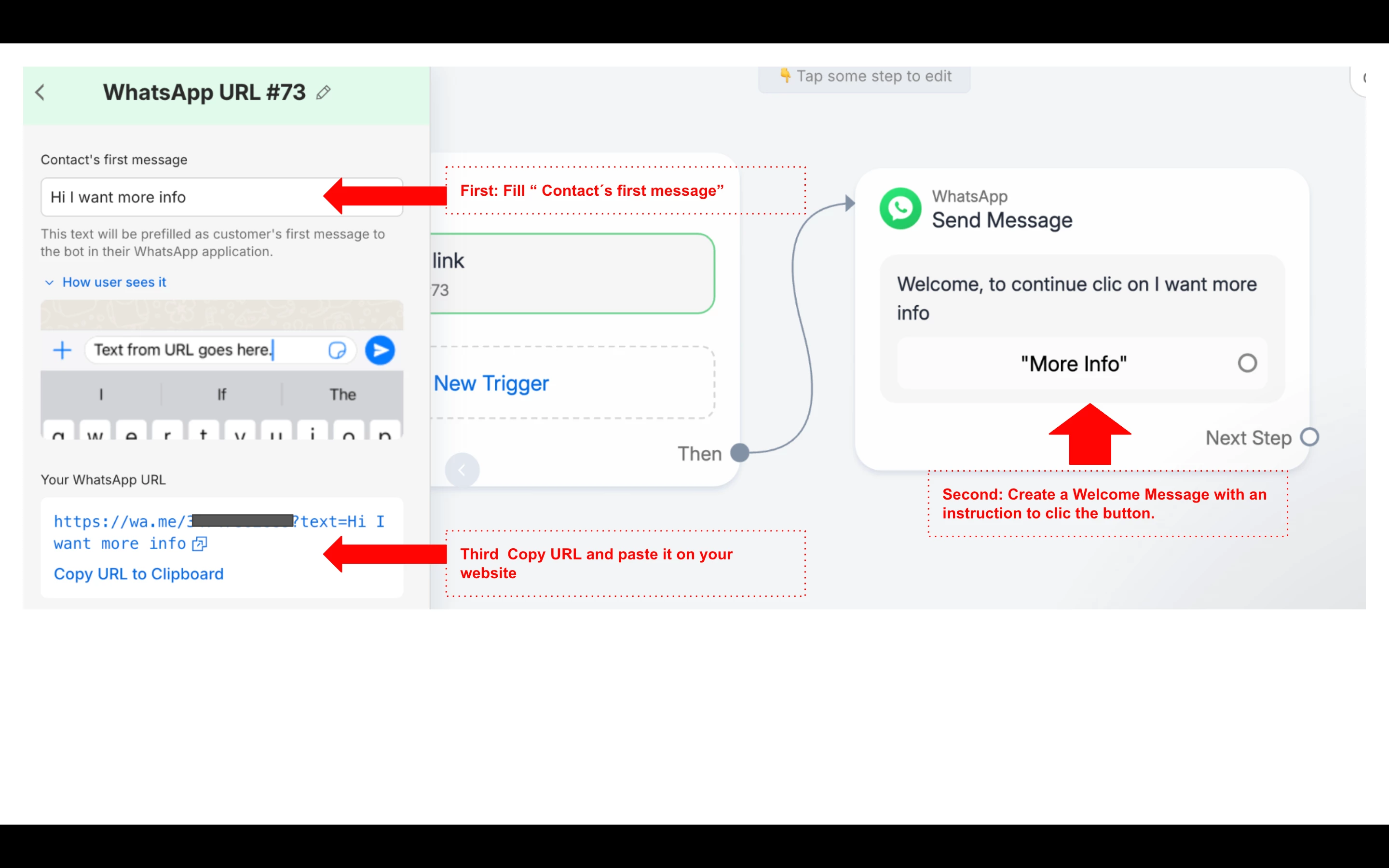
Step 1 — In ManyChat, create a new flow and add a WhatsApp URL trigger. Fill in the "Contact's first message" field (e.g. "Hi I want more info") — this text will be pre-filled automatically in the user's WhatsApp when they click your link.

Step 2 — Add a welcome message to your flow that guides the user to tap a button

Step 3 — Copy the generated WhatsApp URL and add it to your website as a button or link.

When a user clicks the link → WhatsApp opens with the pre-filled text → they hit send → your automation triggers. ✅

Here's ManyChat's official guide for this: https://help.manychat.com/hc/en-us/articles/20083006204444-WhatsApp-Ref-URL-Trigger



3 replies

cata_rendon
Forum|alt.badge.img+5
  • Community Moderator
  • April 21, 2026

Hi ​@sota    Yes you can add a whatsapp link on your site - just create a WP trigger “User clics a Link” and then copy the URL  and include it on your site.

This is what happens when a user clicks the link:

On mobile → It opens the WhatsApp app directly and starts a chat with your number. On PC → It opens WhatsApp Web (if they're logged in) or prompts them to open the app.

A couple of important things to keep in mind:

  • Clicking the link does not automatically add them as a contact in ManyChat. They only become a contact after they send their first message.
  • If you use a pre-filled message in your link and the user edits or replaces it before sending, your automation may not trigger — the keyword or trigger needs to match exactly.

So the flow is the same on both mobile and PC: the link opens WhatsApp → the user sends a message → then the automation kicks in.

Hope that helps!

Catalina Rendon


sota
  • Author
  • Up-and-Comer
  • April 21, 2026

ok noted , so i can not define the trigger to be a link click , the user need to enter someting? Thanks


@cata_rendon 


cata_rendon
Forum|alt.badge.img+5
  • Community Moderator
  • Answer
  • April 21, 2026

Hi @sota! Yes, the trigger isn't based on the click itself — it's based on the message the user sends. Here's how to set it up properly:

Step 1 — In ManyChat, create a new flow and add a WhatsApp URL trigger. Fill in the "Contact's first message" field (e.g. "Hi I want more info") — this text will be pre-filled automatically in the user's WhatsApp when they click your link.

Step 2 — Add a welcome message to your flow that guides the user to tap a button

Step 3 — Copy the generated WhatsApp URL and add it to your website as a button or link.

When a user clicks the link → WhatsApp opens with the pre-filled text → they hit send → your automation triggers. ✅

Here's ManyChat's official guide for this: https://help.manychat.com/hc/en-us/articles/20083006204444-WhatsApp-Ref-URL-Trigger