Question

How to send replies after auto-DMs

  • Nov 2, 2026 8:49 PM UTC
  • 6 comments
  • 47 views

GeorgeV

I have set auto-dm links from comments on specific keywords which is working fine and they receive the link via DM,, but I also then want manychat to send a reply back to the user with a message to their original message, informing them that I have now sent them  the link, and they should check their DMs.  I cannot see in the help files how to automate this second part of the requirement, if anyone can help that would be great!

6 replies

SumGenius
Forum|alt.badge.img
  • Smooth talker
  • Nov 3, 2026 7:45 AM UTC

You don't need a second automation for this. Open the comment trigger on that automation and look for the option to publicly reply to comments. Turn it on and add your message there, something like "Just sent you the link, check your DMs!" It posts under their comment whenever the DM fires.

Add a few different versions of the reply if it lets you, so the same line isn't repeated under every comment. That looks less spammy to Instagram.

One tip: people who don't follow you get the DM in their Message Requests, not their main inbox. Something like "check your DMs (or message requests)" saves you a few "never got it" replies.


GeorgeV
  • Author
  • Up-and-comer
  • Nov 3, 2026 11:08 PM UTC

ok thanks goddit. So I now then want to send them a follow up message 23 hours later. I’m using quick automation currently to send DMs and replies, the ‘Auto-DM links from comments’ template...and there seems to be no option for this. But I see the there is a ‘Follow up to re-engage and build trust’ option in a different template, the ‘Auto-send links in DM’ so….not sure how I get that feature in the current template I’m using... as I can’t really use this later template as that doesn’t have the ‘reply to comments’ option… so any ideas on how I can create follows up messages in the current template I’m using! Thanks! 


SumGenius
Forum|alt.badge.img
  • Smooth talker
  • Nov 3, 2026 11:57 PM UTC

Quick automations are pretty locked down, so you'll probably need to rebuild this one in the full Flow Builder. Then it's: comment trigger, public reply, first DM, a Smart Delay of 23 hours, then your follow-up message.

One catch that matters more than the template: a comment doesn't open Instagram's 24-hour messaging window. Only the person replying to you or tapping a button in your DM does. If they just comment and never interact with the DM, the 23-hour follow-up has nothing to send through and will fail.

So set the first DM up like this:

1. First message: "Want the link? Tap below" with a button.
2. The button tap sends the link. That tap opens the 24-hour window.
3. Start the 23-hour delay from that tap, not from the comment, then send the follow-up.

As a bonus, people who tap the button are the ones actually interested, so your follow-up goes to warmer leads.


cata_rendon
Forum|alt.badge.img+5
  • Community Moderator
  • Nov 4, 2026 7:42 PM UTC

ok thanks goddit. So I now then want to send them a follow up message 23 hours later. I’m using quick automation currently to send DMs and replies, the ‘Auto-DM links from comments’ template...and there seems to be no option for this. But I see the there is a ‘Follow up to re-engage and build trust’ option in a different template, the ‘Auto-send links in DM’ so….not sure how I get that feature in the current template I’m using... as I can’t really use this later template as that doesn’t have the ‘reply to comments’ option… so any ideas on how I can create follows up messages in the current template I’m using! Thanks! 

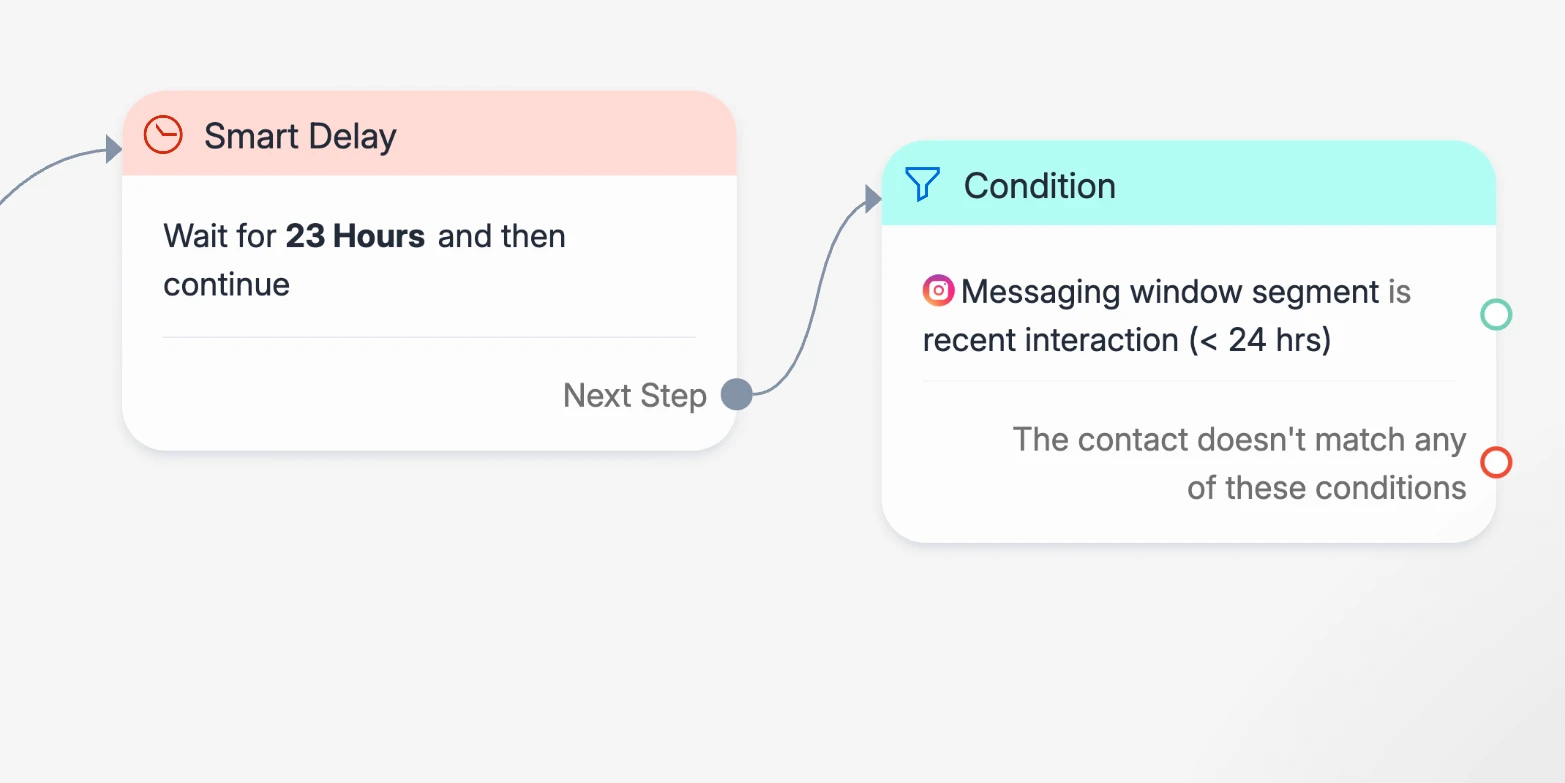
Hi ​@GeorgeV , its easy, in your main flow follow by the last message, just add a 23 hour smart delay, then a condition to check if the user is under the  “window segment is recent interaction < 24 hrs”, and then toggle it to the “follow up message” you want them to get.

You dont a need a template to create this, just do it directly in your flow editor.

Cheers

Cata Rendón


GeorgeV
  • Author
  • Up-and-comer
  • Nov 7, 2026 7:05 AM UTC

thank you for this - As I mentioned I’ve created this using quick automation, are you saying I can use the flow editor to add this to that automation? I thought you created automations using either quick automation, OR the flow editor…. are these interchangable?


cata_rendon
Forum|alt.badge.img+5
  • Community Moderator
  • Nov 10, 2026 4:00 PM UTC

Hi ​@GeorgeV 

Yes, you don’t need to rebuild it. Open your Quick Automation, click the three dots at the top right and choose “Switch to Flow Builder”. That turns it into a regular flow, so you keep what you already have and can edit it in the Flow Builder.

Then, after the last message, add:

  1. Smart Delay of 23 hours
  2. Condition: window segment is recent interaction < 24 hrs
  3. Your follow-up message

The condition matters because Instagram only lets you send that follow-up if the person interacted with you in the DM (replied or tapped a button) in the last 24 hours. If they never did, the condition just stops the flow instead of failing.

Hope this helps!

Cata Rendon