Question

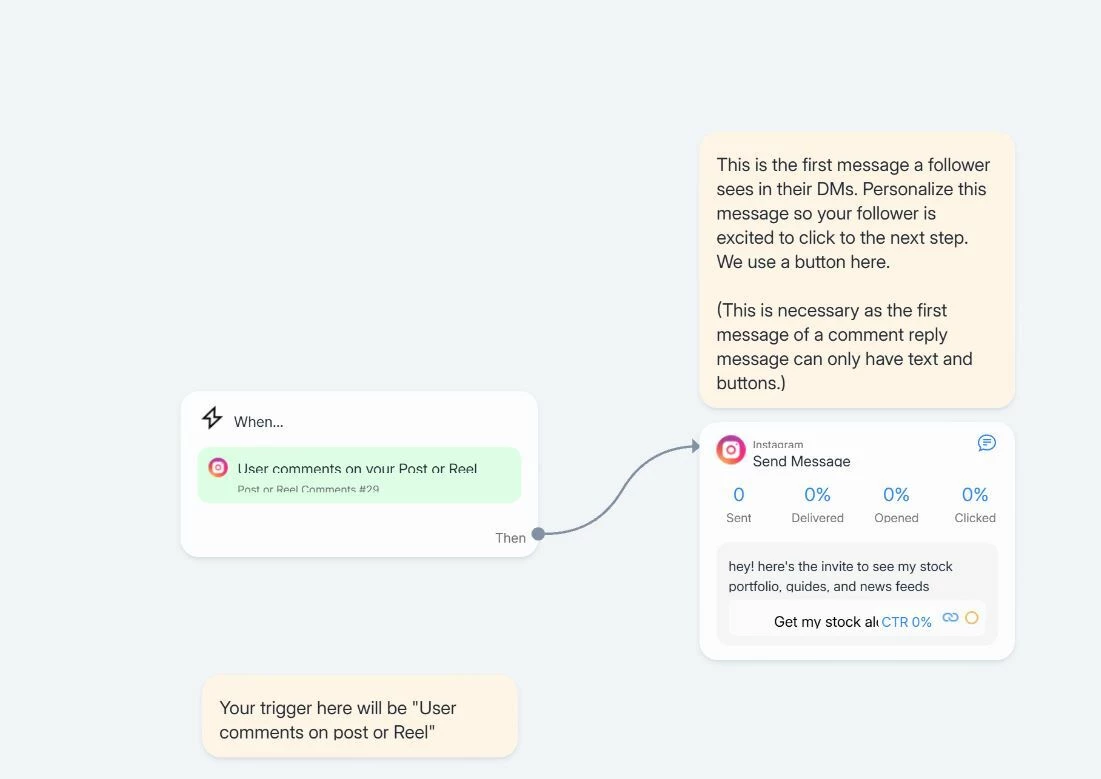
I want to set-up automated comment dm. However it doesn't work with this workflow.

  • March 6, 2026
  • 1 comment
  • 9 views

JohnnyliXf

I set-up this workflow instead of the other comment dm workflow because it doesn’t take two steps to send the link to someone. 

For some reason, its not working at the moment

1 reply

SumGeniusAI
  • Message Musketeer
  • March 6, 2026

Hey Johnny! Looking at your screenshot, a few things to check:

1. Is the automation set to Live?

Make sure you've clicked "Set Live" in the top right of the flow builder. If it's still in draft/paused mode, it won't fire even if the trigger is configured correctly.

 2. Check which post the trigger is linked to

Your trigger says "Post or Reel Comments #29" — make sure this is pointing to the correct post. If you set it to a specific post and that post was deleted or archived, the trigger won't match any new comments. Go into the trigger settings and confirm it's linked to the right post (or switch to "All Posts or Reels" if you want it to work across everything — that requires Pro though).

3. Keyword settings

If you have specific keywords configured in Step 2 of the trigger setup, the DM will only send when comments contain those exact keywords. If you want it to fire on any comment, make sure you selected "Any comment" instead of "Specific Keywords."

4. Instagram connection

Go to Settings → Instagram and make sure your account is still connected. Sometimes the connection drops after password changes or Instagram updates, and the trigger silently stops working.


5. The first message limitation

You mentioned you chose this workflow because it doesn't take two steps. Just a heads up — Instagram requires the first message of a comment reply to only contain text and buttons (no images, carousels, etc). Your message looks like it has text + a button which should be fine, but worth double-checking there's nothing else in that node.

Start with #1 and #2 — those are the most common reasons for 0 sends.