Solved

Instagram automation

  • May 28, 2026
  • 7 comments
  • 52 views

karin.g

I’m new to manychat. I just set up an Instagram automation, but it is not working. I have no idea what’s wrong. Any idea what could be the issue?

Best answer by cata_rendon


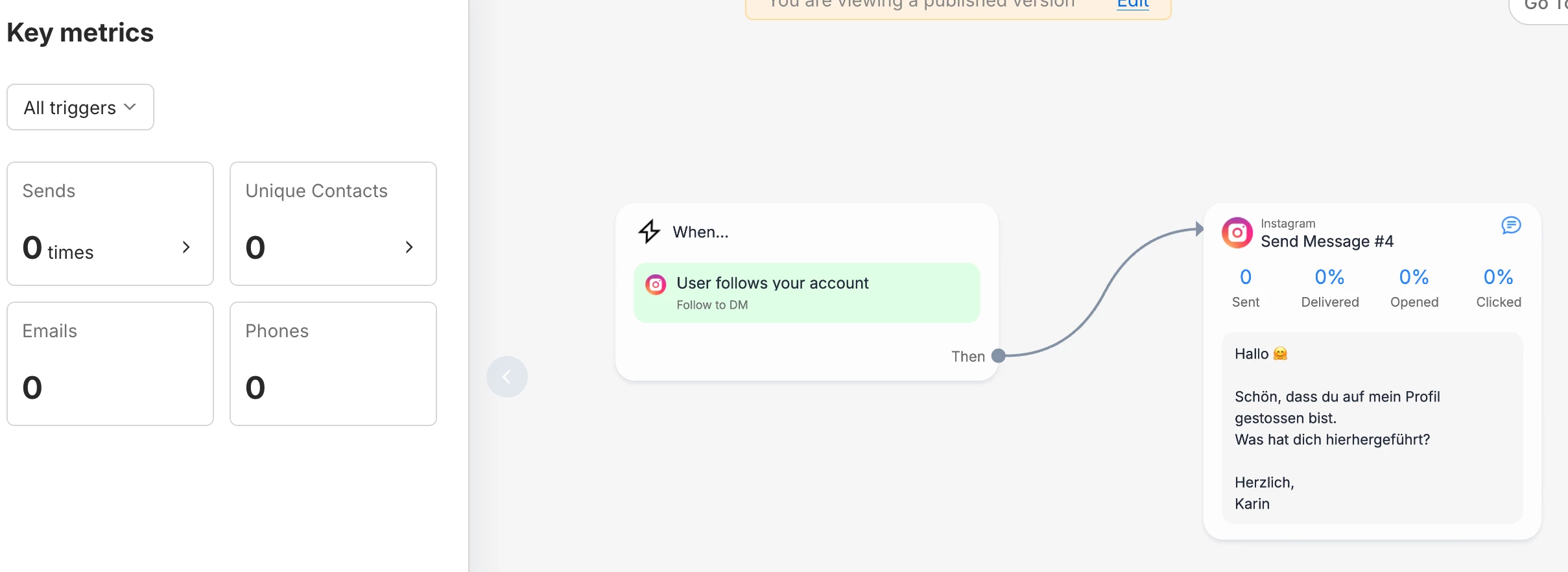
Hi ​@karin.g  thanks for sharing the screenshot — that really helps! 😊

It looks like you're using the Follow to DM feature, which is currently in Beta. A few things worth knowing about how it works:

How Meta controls this feature:

  • Not all accounts have access to it yet — Meta decides who gets it and when.
  • The automation triggers only once per follower. If someone unfollows and follows again, it won't fire a second time.
  • Meta limits this to one Follow to DM message per user per week across all accounts. If a person follows multiple accounts using this feature, they'll only receive a DM from the first one. This is a spam-prevention measure on Meta's side.

A couple of best practices while you're at it:

  • Add a short delay (a few seconds) before the message sends — it feels more natural and less automated.
  • Lead with a warm welcome; save any pitch for later.

Also worth trying: Refresh your Instagram permissions in ManyChat — this re-establishes the connection and often fixes trigger issues. Go to: Help → Refresh Permissions

Here's the official guide for Follow to DM: https://help.manychat.com/hc/en-us/articles/23096654243740-Follow-to-DM-on-Instagram-Say-Hi-to-New-Followers-BETA

Hope this helps! Let us know if you have more questions. 

Catalina Rendon

 

7 replies

cata_rendon
Forum|alt.badge.img+5
  • Community Moderator
  • May 28, 2026


Hi ​@karin.g , welcome to manychat. 


I’m sorry to hear you’re experiencing issues with your new IG Comment Automation — I know how frustrating this can be.

Here are a few things I’d recommend double-checking:

  1. Instagram permissions A quick fix that often helps is refreshing your Instagram permissions in ManyChat.
    You can do this by going to your ManyChat account and clicking Help → Refresh Permissions.
  2. Follow the official IG automation troubleshooting guide
    This step-by-step guide covers several edge cases that can cause comment automations to stop firing and is very helpful for diagnosing issues like this:
    https://help.manychat.com/hc/en-us/articles/14281308423452-Instagram-automation-troubleshooting
  3. Check for platform-wide issues
    Sometimes this is related to a temporary issue on Instagram or ManyChat’s side. You can check the current system status here:
    https://status.manychat.com/
  4. One-time trigger behavior
    Just as a reminder, Instagram comment automations only trigger once per user per post. If the same user commented again, the automation would not fire a second time.

Hopefully one of these points helps you pinpoint the issue

Cheers,
Cata Rendon


karin.g
  • Author
  • Up-and-comer
  • June 4, 2026


Hi ​@karin.g , welcome to manychat. 


I’m sorry to hear you’re experiencing issues with your new IG Comment Automation — I know how frustrating this can be.

Here are a few things I’d recommend double-checking:

  1. Instagram permissions A quick fix that often helps is refreshing your Instagram permissions in ManyChat.
    You can do this by going to your ManyChat account and clicking Help → Refresh Permissions.
  2. Follow the official IG automation troubleshooting guide
    This step-by-step guide covers several edge cases that can cause comment automations to stop firing and is very helpful for diagnosing issues like this:
    https://help.manychat.com/hc/en-us/articles/14281308423452-Instagram-automation-troubleshooting
  3. Check for platform-wide issues
    Sometimes this is related to a temporary issue on Instagram or ManyChat’s side. You can check the current system status here:
    https://status.manychat.com/
  4. One-time trigger behavior
    Just as a reminder, Instagram comment automations only trigger once per user per post. If the same user commented again, the automation would not fire a second time.

Hopefully one of these points helps you pinpoint the issue

Cheers,
Cata Rendon

Hi Cata,

Thank you so much for your support. I did all that, and it’s still not working. I’m a bit desperate… Is there something else you can recommend?

Best,
Karin 


cata_rendon
Forum|alt.badge.img+5
  • Community Moderator
  • June 4, 2026

Hi ​@karin.g , if you want you can just share here an screenshot of you automation so we can try to help you to indentify what is going on. 


karin.g
  • Author
  • Up-and-comer
  • June 5, 2026


SumGenius
Forum|alt.badge.img
  • Smooth talker
  • June 5, 2026

The follow to dm feature has been inconsistent for users for months, multiple nuances. It also looks like you do not have any buttons attached to this message, double check buttons are attached. Try to create a comment to dm trigger and test. If that doesn’t work it’s a connection issue.


karin.g
  • Author
  • Up-and-comer
  • June 9, 2026

The follow to dm feature has been inconsistent for users for months, multiple nuances. It also looks like you do not have any buttons attached to this message, double check buttons are attached. Try to create a comment to dm trigger and test. If that doesn’t work it’s a connection issue.

Thank you :-)
The feature is inconsistent for month??? How can this be?


cata_rendon
Forum|alt.badge.img+5
  • Community Moderator
  • Answer
  • June 9, 2026


Hi ​@karin.g  thanks for sharing the screenshot — that really helps! 😊

It looks like you're using the Follow to DM feature, which is currently in Beta. A few things worth knowing about how it works:

How Meta controls this feature:

  • Not all accounts have access to it yet — Meta decides who gets it and when.
  • The automation triggers only once per follower. If someone unfollows and follows again, it won't fire a second time.
  • Meta limits this to one Follow to DM message per user per week across all accounts. If a person follows multiple accounts using this feature, they'll only receive a DM from the first one. This is a spam-prevention measure on Meta's side.

A couple of best practices while you're at it:

  • Add a short delay (a few seconds) before the message sends — it feels more natural and less automated.
  • Lead with a warm welcome; save any pitch for later.

Also worth trying: Refresh your Instagram permissions in ManyChat — this re-establishes the connection and often fixes trigger issues. Go to: Help → Refresh Permissions

Here's the official guide for Follow to DM: https://help.manychat.com/hc/en-us/articles/23096654243740-Follow-to-DM-on-Instagram-Say-Hi-to-New-Followers-BETA

Hope this helps! Let us know if you have more questions. 

Catalina Rendon