
Question

Keyords bypassing quick replies

  • April 5, 2026
  • 8 comments
  • 70 views

MoonlitPMU

Hi!


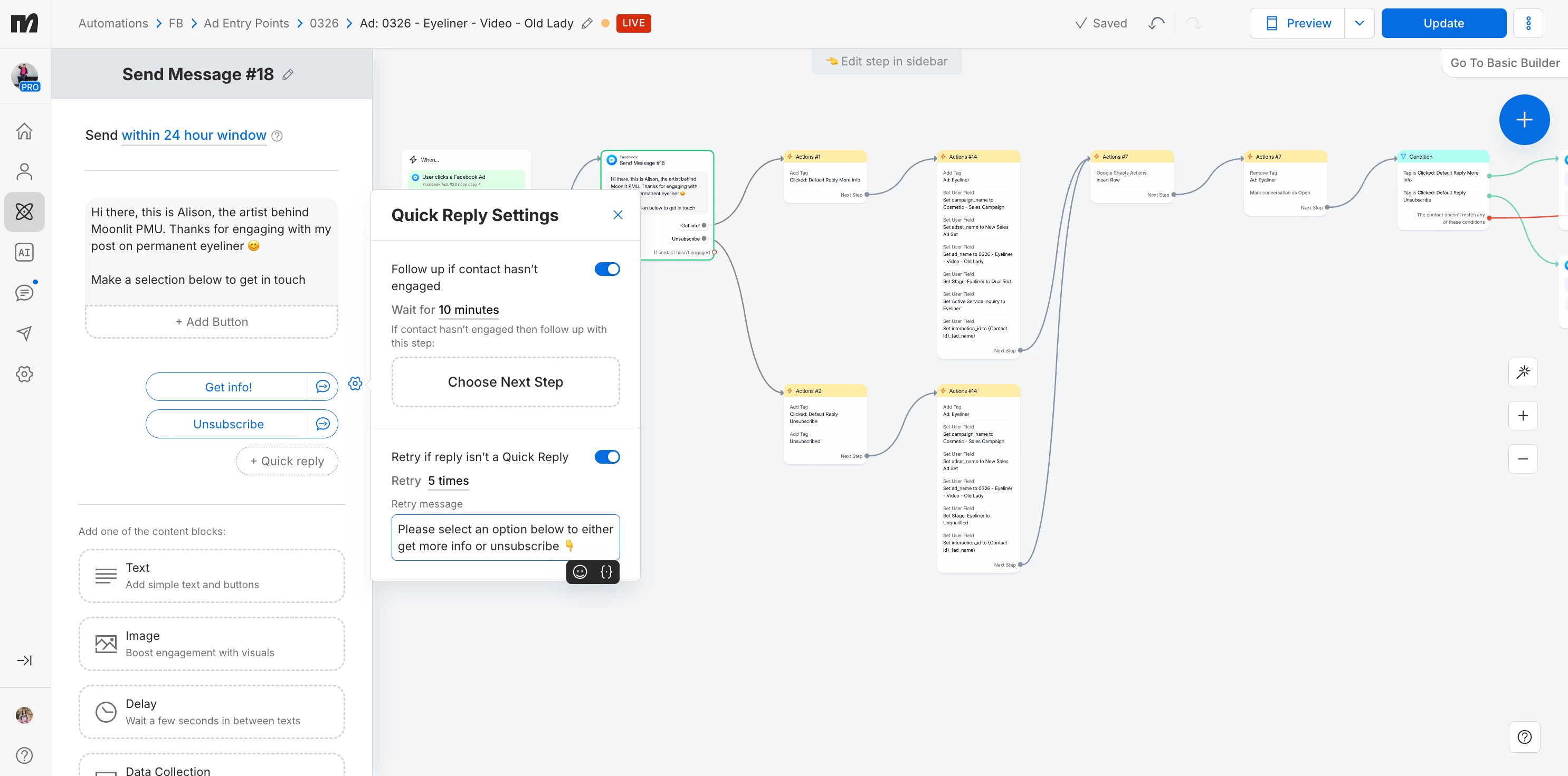
I am trying to use quick replies as a way to force engagement coming from my meta ads for attribution via a tagging and user fields system


Basically, I try to force them to select “Get Info,” or “Unsubscribe” to set appropriate attribution in a specific ad entry flow before sending them to whatever general flow they belong in


The default reply settings are supposed to be making them click for 5x attempts


I also have flows going for various keywords


It appears when they enter the flow but send a message that contains one of my keywords, without clicking a default reply, it is taking them out of the flow and as such not giving the the attribution


I either want:

  • The tags/user field actions to fire for the ad attribution before sending to the keyword flow
  • Or, the keyword flows not to trigger on this entry message and force the default reply engagement instead (and then have the keyword flows work as expected after that)

I can go back to a button system if that would be better.


The end goal is ad attribution. 
 

8 replies

samiur
  • Up-and-comer
  • April 5, 2026

I believe this is the opt-in message (Hi there, this is Alison...). Manychat expect the user will click the button or quick reply to enter the flow but if a user DM the Keyword for example eyeliner then Manychat by default will trigger the flow that is connected with the Keyword "Eyeliner” 


Here you can remove the common keywords to trigger the flow or you can guide the user to tap the button below (Tap the button belwo to start 👇) 


Buttons:

✅ Get info!
❌ Unsubscribe


cata_rendon
Forum|alt.badge.img+5
  • Community Moderator
  • April 6, 2026

Hi!


I am trying to use quick replies as a way to force engagement coming from my meta ads for attribution via a tagging and user fields system


Basically, I try to force them to select “Get Info,” or “Unsubscribe” to set appropriate attribution in a specific ad entry flow before sending them to whatever general flow they belong in


The default reply settings are supposed to be making them click for 5x attempts


I also have flows going for various keywords


It appears when they enter the flow but send a message that contains one of my keywords, without clicking a default reply, it is taking them out of the flow and as such not giving the the attribution


I either want:

  • The tags/user field actions to fire for the ad attribution before sending to the keyword flow
  • Or, the keyword flows not to trigger on this entry message and force the default reply engagement instead (and then have the keyword flows work as expected after that)

I can go back to a button system if that would be better.


The end goal is ad attribution. 
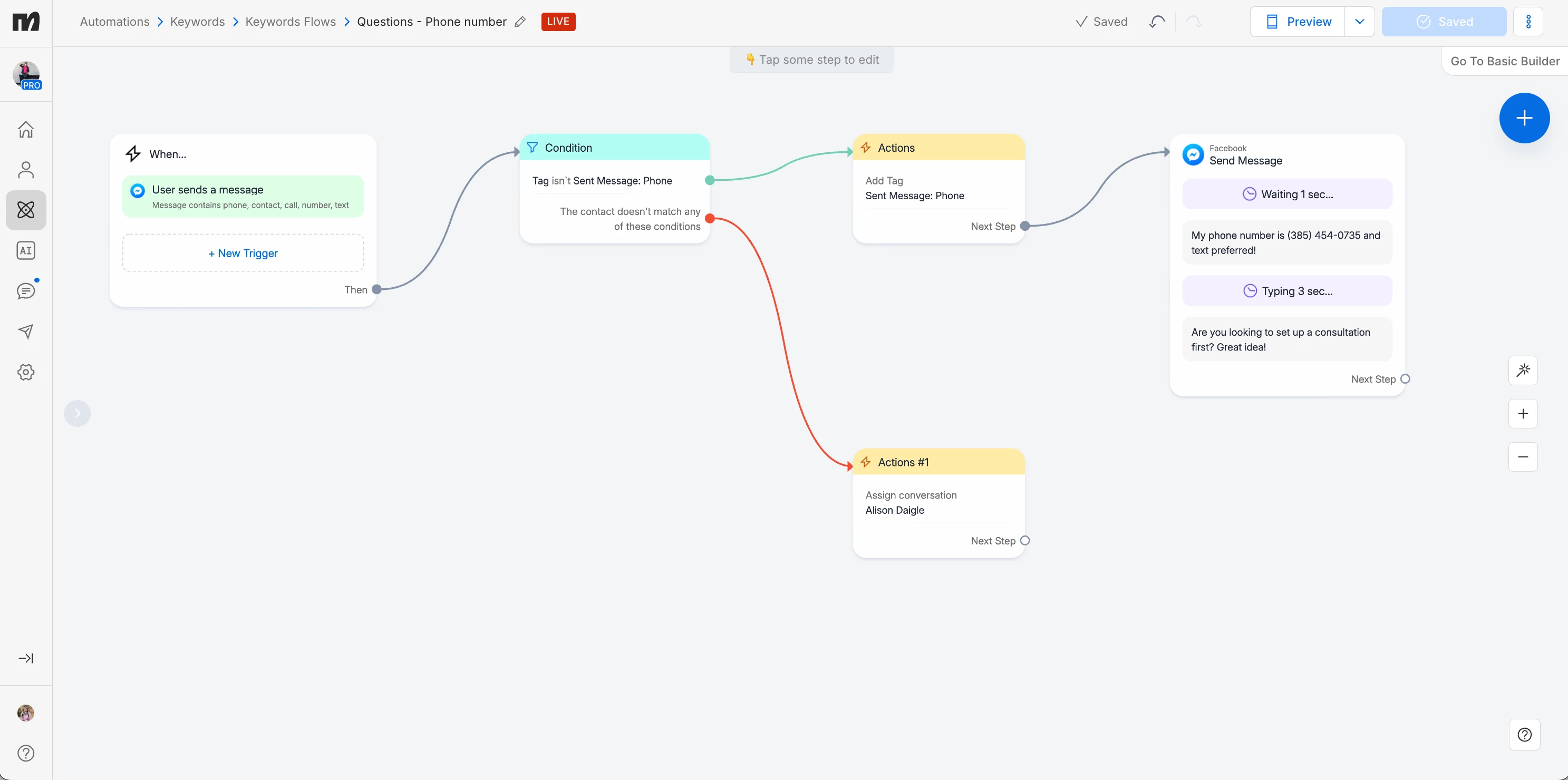
 

Hi ​@MoonlitPMU, my advice to you, only use key words to drive new conversations from a post, but not inside your automations, because user´s might ending in the wrong place. i.e I see you are using the word “phone” / “contact” to trigger a new automation, that key word is something people might type any time so If I were you, I would take that out, and only register user´s phone after they have clicked your welcome flow from the add using the “Data Collection” message.

Hope this helps

Catalina Rendon


MoonlitPMU
  • Author
  • Smooth talker
  • April 7, 2026

@samiur That flow i only an entry flow, so I’m ok removing the keywords from those flows in particular. How do I do that?

@cata_rendon I want the keyword flows in the automations bc they ask the same question over and over and over. I do not want them in this initial message response tho. 


Devtrest
  • Smooth talker
  • April 7, 2026

Yes this is happening because Keywords trigger as soon as the user sends a matching word, even if they did not click your quick reply first. Manychat’s Keyword trigger is built to react instantly to matching words in a message.

So the clean fix is:

  1. Tag them at the ad entry step first
  2. Then show the quick replies
  3. In your keyword flows, add a condition/tag check so they only continue if that ad-entry tag already exists

Simple idea:

Ad entry → add attribution tag/user fields first → show quick replies → keyword flows check for that tag

This works better because Actions can set tags and user fields right away at the start of the flow.

If you want to force the quick reply more strictly, then honestly buttons/quick replies only is the safer setup. A keyword flow can still pull them away if their typed message matches a keyword.

So the short answer is:

Do the ad attribution first, before they can escape into a keyword flow.
Then make every keyword flow check for that attribution tag before moving on.


MoonlitPMU
  • Author
  • Smooth talker
  • April 7, 2026

@Devtrest it doesnt allow you to do that. The first thing from my ad has to be a message with buttons or quick replies. Otherwise, I would’ve done that in the first place 🥲


i think the ideal solution is prob to turn off my keyword automations from firing within these ad entry point ones (those arent pictured)


cata_rendon
Forum|alt.badge.img+5
  • Community Moderator
  • April 8, 2026

Hi ​@MoonlitPMU , that is right, the first message has to include buttons. But as I said, is better to collect phone info through the regular flow, and not through key word. If you are using guide conversations, your copy and flow structure should help the lead to understand what the next step is and what to do. i.e Domibot (my personal finance bot, achives 200 interactions per using only with guided conversations, I managed to achived this by being very clear in each steep)

Hope this tips helps you!

Cheers!

Catalina Rendon


MoonlitPMU
  • Author
  • Smooth talker
  • April 8, 2026

Hi, im not collecting phone info. its a keyword to send my phone number


Do you know how i can turn off outside automation on a specific automation?


cata_rendon
Forum|alt.badge.img+5
  • Community Moderator
  • April 13, 2026

Hi, im not collecting phone info. its a keyword to send my phone number


Do you know how i can turn off outside automation on a specific automation?

Hi ​@MoonlitPMU check the flow trigger one by one and delete the ones that might create confussion, i.e delete key words. 

Regarding providing your phone number, you can include in your fist - second message so people can contact you directly.

Cheers!

Cata