Solved

Manychat Directing to FB instead of my Website Link

  • January 17, 2026
  • 9 replies
  • 71 views

CourtneyWhittington

Hi! My IG (@dcmoms) has people directed to a link on my website (I have double checked it a lot), but Manychat is sending people the link to my facebook page instead. What am I doing wrong?! This started a few days ago and hasn’t been corrected. I have personally been DMing people the correct link. Thank you for any help! https://www.instagram.com/p/DTdGbs4jiSK/

Best answer by cata_rendon

@Manychat Community, I notice that ManyChat is now sending people to this weird FB URL for ALL of my auto DMs now. All of my automatons are correctly directed to my site. 

It only sends to a weird URL on phones (mine and followers). The automation works on my computer! 

Does anyone know how I can get actual support (not a bot!) from ManyChat? Thank you!! 

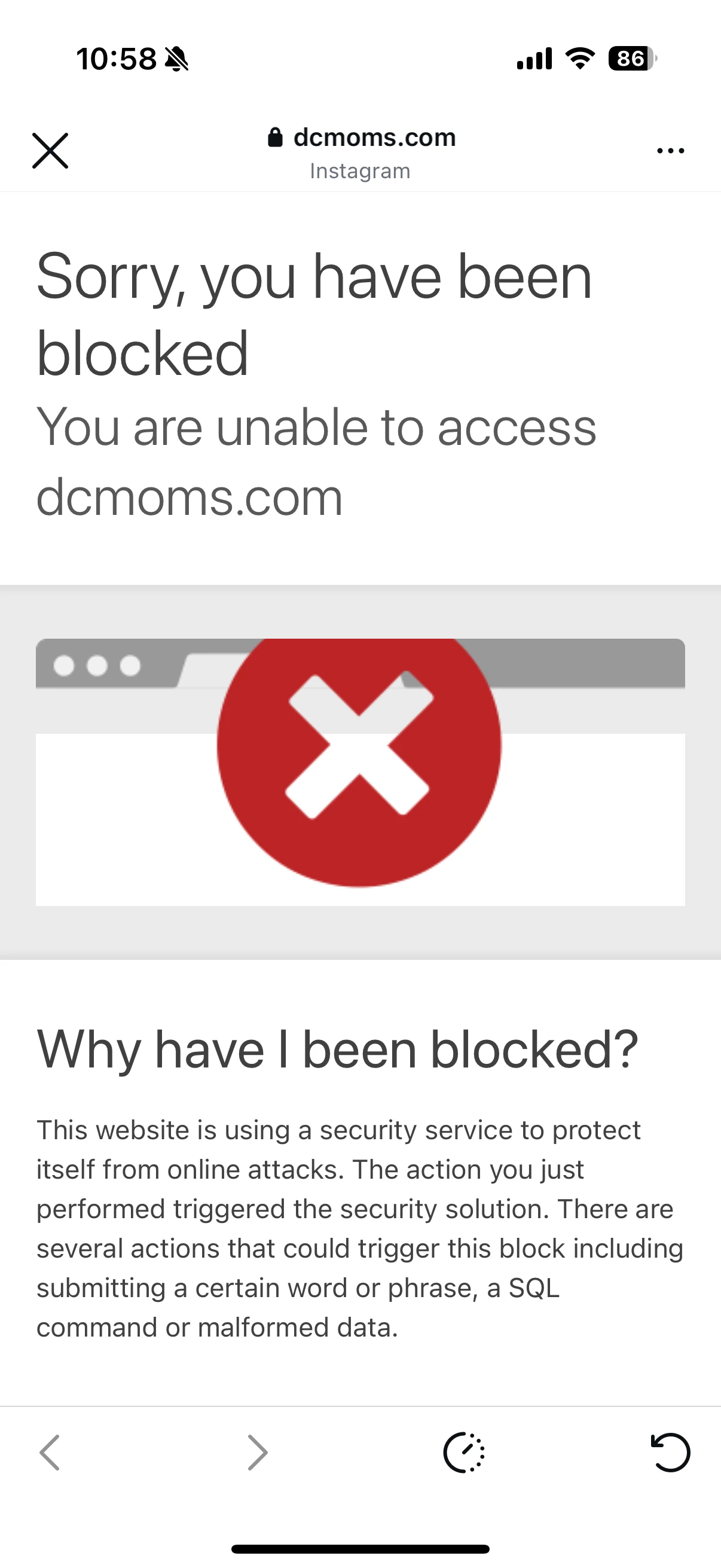
Hi ​@CourtneyWhittington , I just tested it myself from my phone, and you’re right — on mobile (inside Instagram’s in-app browser) I’m getting a security block message saying the site cannot be accessed. 

This doesn’t seem to be a ManyChat redirect issue. What I think is happening is:

  • On desktop, the site loads normally → no restriction

  • On mobile / Instagram in-app browser, the site is being blocked by a security layer (firewall / WAF)

  • Probably when the site is blocked, Instagram / Meta falls back to showing a Facebook-related URL, which makes it look like ManyChat is redirecting to Facebook

That’s why:

  • The automation works correctly on your computer

  • It consistently fails only on phones (yours and followers’)

This usually happens when a site has:

  • A firewall, security plugin, or hosting protection (Cloudflare, Wordfence, Sucuri, etc.)

  • Rules that block in-app browsers, mobile user agents, or Meta traffic

My recommendation would be to check with your hosting provider or web developer and ask them to:

  • Whitelist Instagram / Facebook in-app browsers

  • Review recent firewall or security rule changes

  • Test direct access to the site from Instagram’s in-app browser specifically

From everything I can see, ManyChat is sending users to the correct URL — the block is happening after the click, at the website level.

Hope this helps clarify what’s going on 🙏

Cheers!

Cata Rendon


9 replies

CourtneyWhittington

I noticed this glitch is only happening on my phone and not on my computer…


CourtneyWhittington

Any thought or ideas? I am getting messages asking why they have to login to Facebook...


  • Up-and-Comer
  • January 17, 2026

@CourtneyWhittington Yes, I know why this issue happening?


SumGeniusAI
  • Up-and-Comer
  • January 18, 2026

This is likely the URL shortener redirect causing issues. ManyChat routes all links through my.manychat.com first, which can break things on mobile.

Fix: Go to Settings > General > Card URL Shortener and select "shortener is disabled"

You'll lose click-through tracking, but you can still use Tags to track who clicked your buttons. Also make sure your URL has the full https:// in front.


CourtneyWhittington

Hi ​@SumGeniusAI! Thank you! I just updated that setting. However, it is still not working (yet!). It is sending people to this URL: https://www.facebook.com/plugins/like.php?href=https://dcmoms.com/in-around-dc/epic-guide-to-winter-in-the-dc-area/&layout=button_count&show_faces=false&width=105&action=like&colorscheme=light&height=21 

 I am sure there are variations of this URL, but it’s an example. Is there something wrong with my Facebook plug-in? I know they are connected and have been using Manychat for months with no problem. I am unsure why this suddenly started. Thank you! 


SumGeniusAI
  • Up-and-Comer
  • January 18, 2026

I see the issue now - that URL is a Facebook Like button plugin, not your actual website link.

The URL you're sending people to:

https://www.facebook.com/plugins/like.php?href=https://dcmoms.com/...

The URL you WANT to send them to:

https://dcmoms.com/in-around-dc/epic-guide-to-winter-in-the-dc-area/

Somewhere in your ManyChat flow, you accidentally pasted the Facebook Like button embed code instead of your direct website link. Go into your flow, find where that button/link is configured, and replace it with just your actual URL (without the facebook.com/plugins wrapper).


CourtneyWhittington

On my laptop, it sends people to my website (like I automated it!).

On the phone, it sends people to this weird FB URL (that I didn’t type in).

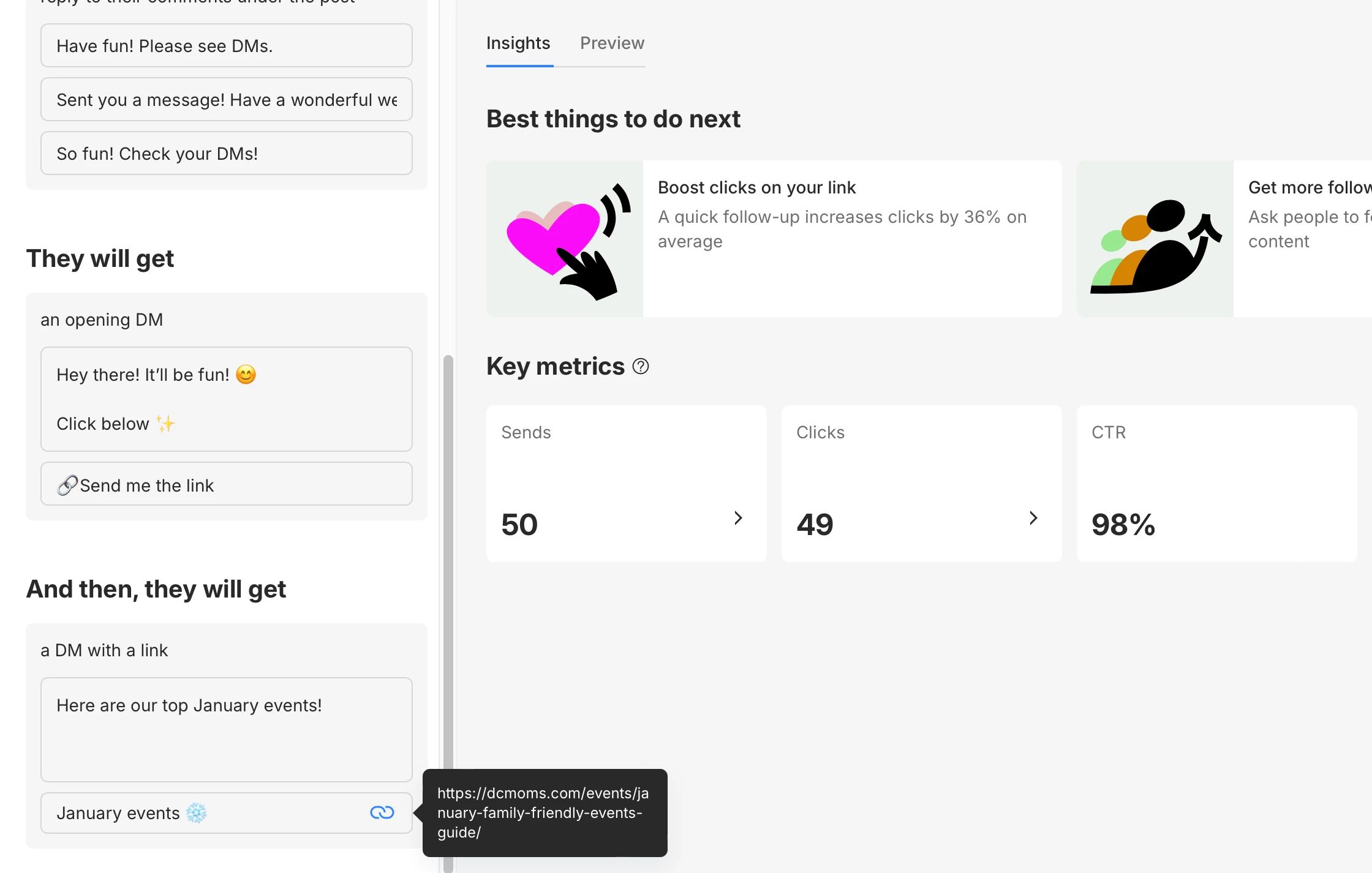
From the screenshot, you can see that I have it automated to the correct place… I am so confused. I always direct people to my site, not my fb. 


CourtneyWhittington

@Manychat Community, I notice that ManyChat is now sending people to this weird FB URL for ALL of my auto DMs now. All of my automatons are correctly directed to my site. 

It only sends to a weird URL on phones (mine and followers). The automation works on my computer! 

Does anyone know how I can get actual support (not a bot!) from ManyChat? Thank you!! 


cata_rendon
Forum|alt.badge.img+4
  • Manychat Community Moderator
  • Answer
  • January 19, 2026

@Manychat Community, I notice that ManyChat is now sending people to this weird FB URL for ALL of my auto DMs now. All of my automatons are correctly directed to my site. 

It only sends to a weird URL on phones (mine and followers). The automation works on my computer! 

Does anyone know how I can get actual support (not a bot!) from ManyChat? Thank you!! 

Hi ​@CourtneyWhittington , I just tested it myself from my phone, and you’re right — on mobile (inside Instagram’s in-app browser) I’m getting a security block message saying the site cannot be accessed. 

This doesn’t seem to be a ManyChat redirect issue. What I think is happening is:

  • On desktop, the site loads normally → no restriction

  • On mobile / Instagram in-app browser, the site is being blocked by a security layer (firewall / WAF)

  • Probably when the site is blocked, Instagram / Meta falls back to showing a Facebook-related URL, which makes it look like ManyChat is redirecting to Facebook

That’s why:

  • The automation works correctly on your computer

  • It consistently fails only on phones (yours and followers’)

This usually happens when a site has:

  • A firewall, security plugin, or hosting protection (Cloudflare, Wordfence, Sucuri, etc.)

  • Rules that block in-app browsers, mobile user agents, or Meta traffic

My recommendation would be to check with your hosting provider or web developer and ask them to:

  • Whitelist Instagram / Facebook in-app browsers

  • Review recent firewall or security rule changes

  • Test direct access to the site from Instagram’s in-app browser specifically

From everything I can see, ManyChat is sending users to the correct URL — the block is happening after the click, at the website level.

Hope this helps clarify what’s going on 🙏

Cheers!

Cata Rendon