Manychat WhatsApp Flow Not Triggering

  • August 25, 2025
  • 4 replies
  • 49 views

HafizHussain

Hi, my customers are sending me WhatsApp messages but they are not getting replies from the ManyChat flow. When I check my mailbox, I don’t see any new incoming messages either. I’ve also emailed support but haven’t received a response yet. Has anyone else experienced this issue or know what might be causing it?

4 replies

rogerioaraujo
Forum|alt.badge.img+1
  • Flow Scholar
  • August 25, 2025

Hello ​@HafizHussain ,
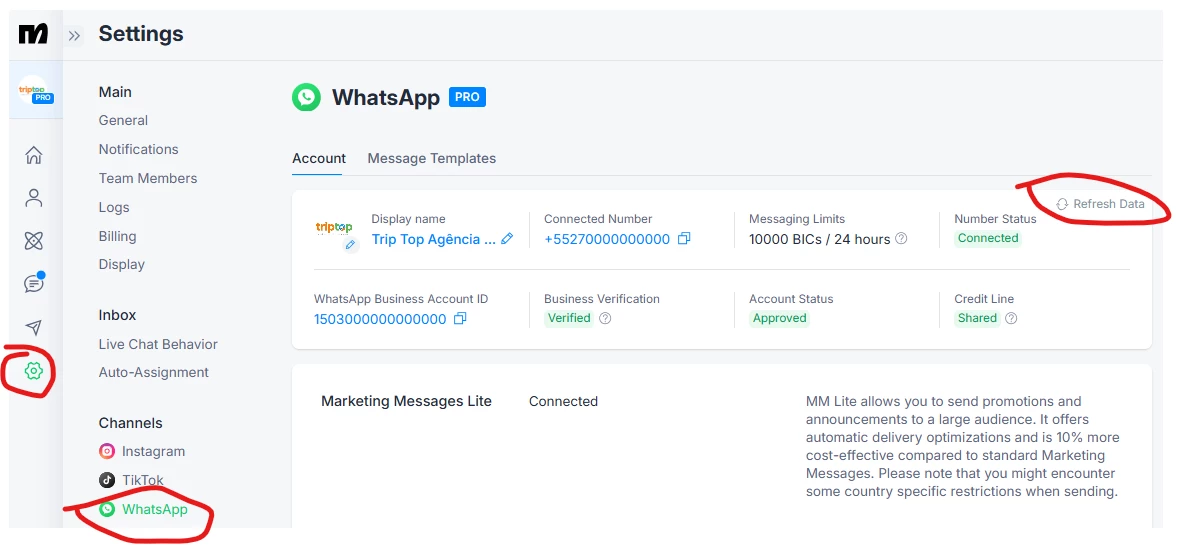
Go to the settings menu, click on the WhatsApp channel, and then click on "Refresh Data" to check if any restriction message appears. Since no messages are coming through, it is possible that there is a restriction from Meta:
 

You can also access the WhatsApp Manager on Facebook to check if the status is connected or if any restriction is shown. Here is the link:
https://business.facebook.com/wa/manage/phone-numbers

If everything is connected, no restrictions are shown, and you are using the Coexistence connection method, which is still in Beta, you can try disconnecting and reconnecting your number. Or, since you have already contacted support, you may wait for their response.


HafizHussain
  • Author
  • Up-and-Comer
  • August 25, 2025

Hi, how do i disconnect and reconnect my number ? 


Hello ​@HafizHussain ,
Go to the settings menu, click on the WhatsApp channel, and then click on "Refresh Data" to check if any restriction message appears. Since no messages are coming through, it is possible that there is a restriction from Meta:
 

You can also access the WhatsApp Manager on Facebook to check if the status is connected or if any restriction is shown. Here is the link:
https://business.facebook.com/wa/manage/phone-numbers

If everything is connected, no restrictions are shown, and you are using the Coexistence connection method, which is still in Beta, you can try disconnecting and reconnecting your number. Or, since you have already contacted support, you may wait for their response.


rogerioaraujo
Forum|alt.badge.img+1
  • Flow Scholar
  • August 26, 2025

To disconnect it, you will need to remove it and then connect it again. The article below provides a step-by-step guide on how to do this:
https://help.manychat.com/hc/en-us/articles/21611097151260-Common-issues-during-WhatsApp-sign-up-and-how-to-fix-them#h_01K22HX97EZRKPYPY1Z7A87SFV

 After removing it, repeat the same process you followed initially to connect it.


Raquel C
Manychat Team Member
Forum|alt.badge.img+3
  • Manychat Community Manager
  • September 4, 2025

Hi ​@HafizHussain did you solve your issue?