Question

Message reply following requesting the user for an image

  • March 10, 2026
  • 12 comments
  • 53 views

MoonlitPMU

Hi! I’m trying to make an automation super conversational, so I’m trying to avoid buttons or weird system prompts.


At one point, I prompt the user to send an image.


When they send an image, I would like the user to receive confirmation that I received the image and will get back to them soon (convo is assigned to me)


If the user enters text, I want the convo just assigned to me


If they do not reply after X amount of time, I want me to receive a different message, or maybe be assigned a tag for follow up


I’ve had a MC admin and a dev look at it, and so far the only way it has workd has been using quick replies with a prompt to “Upload photp,” or “I dont have a photo.” It works, but I am really trying to keep it in a convo format - no button or quick replies


Goal is:

  • I prompt for photo
    • user sends photo
      • get confirmation msg
    • user enters text
      • get a diff message
    • nothing happens
      • either a message later or add a tag to initiative a follow up automation

12 replies

Gustavo Boregio
Forum|alt.badge.img+7
  • Community Moderator & Expert
  • March 10, 2026

@MoonlitPMU you can do that using the Default Reply.

If the content the user sent starts with https:// then it’s likely an image or some other content. And with this, you can craft your logic.

And for the follow up automation, you’ll need to create rules, conditions and delays to get it working.

The exact setup will depend on what you’d like to achieve, but it’s 100% possible to accomplish what you want without using buttons or quick replies ;)


MoonlitPMU
  • Author
  • Up-and-Comer
  • March 10, 2026

Yeah I think I’m all good with the follow up automation.. that’s working elsewhere using a combo of things


So if a user is on their phone and and they upload an image via messenger, even tho all anyone sees as an image, the reply is read as a url on the back-end?


MoonlitPMU
  • Author
  • Up-and-Comer
  • March 10, 2026

@Gustavo Boregio so would it be… Data collect > text > “name whatever” user field > condition if “name whatever” user field contains “http” > yes / no > then route responses as per usual


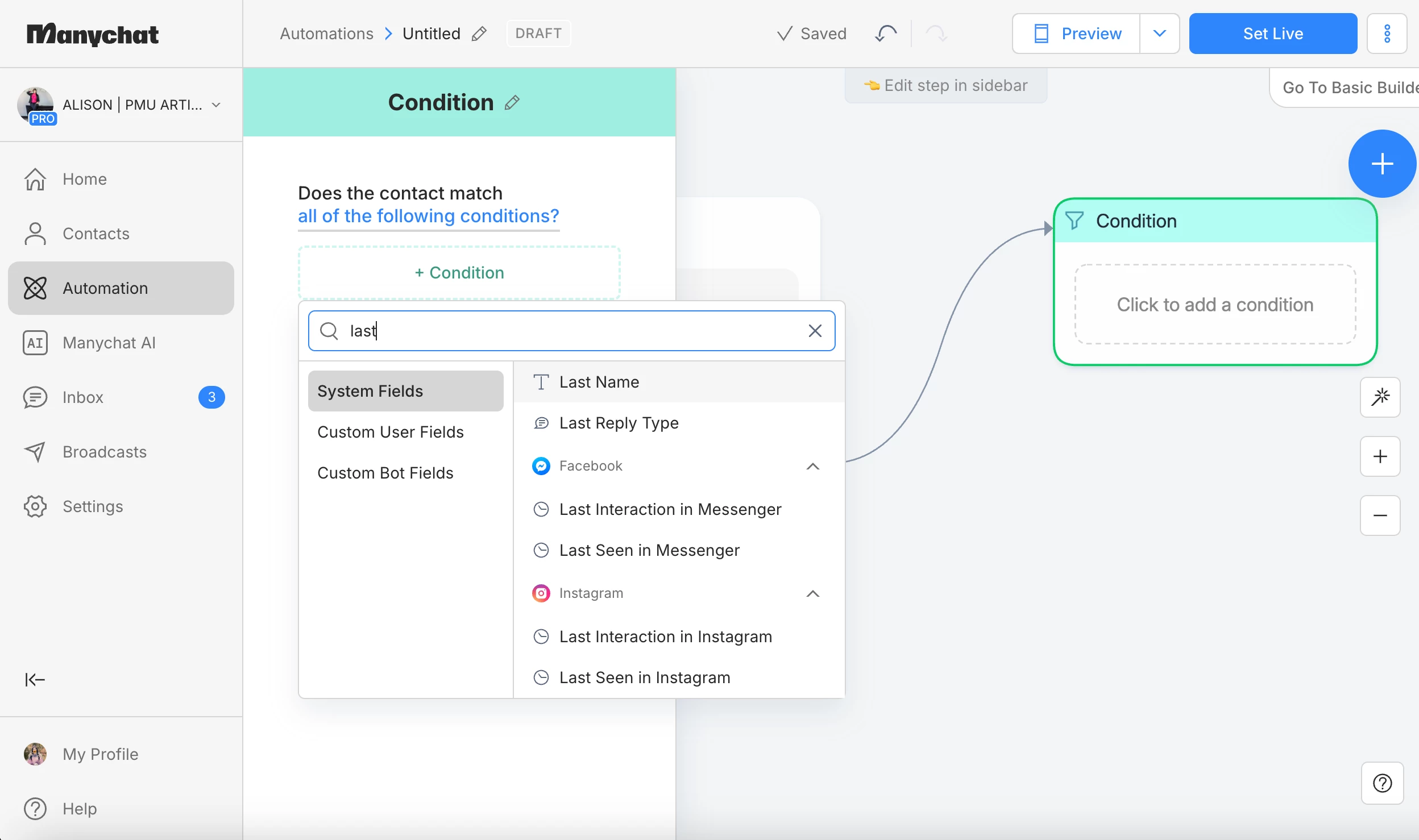
I dont understand why the “Last Reply Type” doesnt include image… seems like that would solve my problem. And probably way more useful than “Audio” lol


(i did try condition > Last Reply Type> Text > yes/no = response. that did not work)


MoonlitPMU
  • Author
  • Up-and-Comer
  • March 11, 2026

@Gustavo Boregio nvm my MC admit figured it out but i am still very curious what you meant


Gustavo Boregio
Forum|alt.badge.img+7
  • Community Moderator & Expert
  • March 11, 2026

@MoonlitPMU glad you figured it out ;)

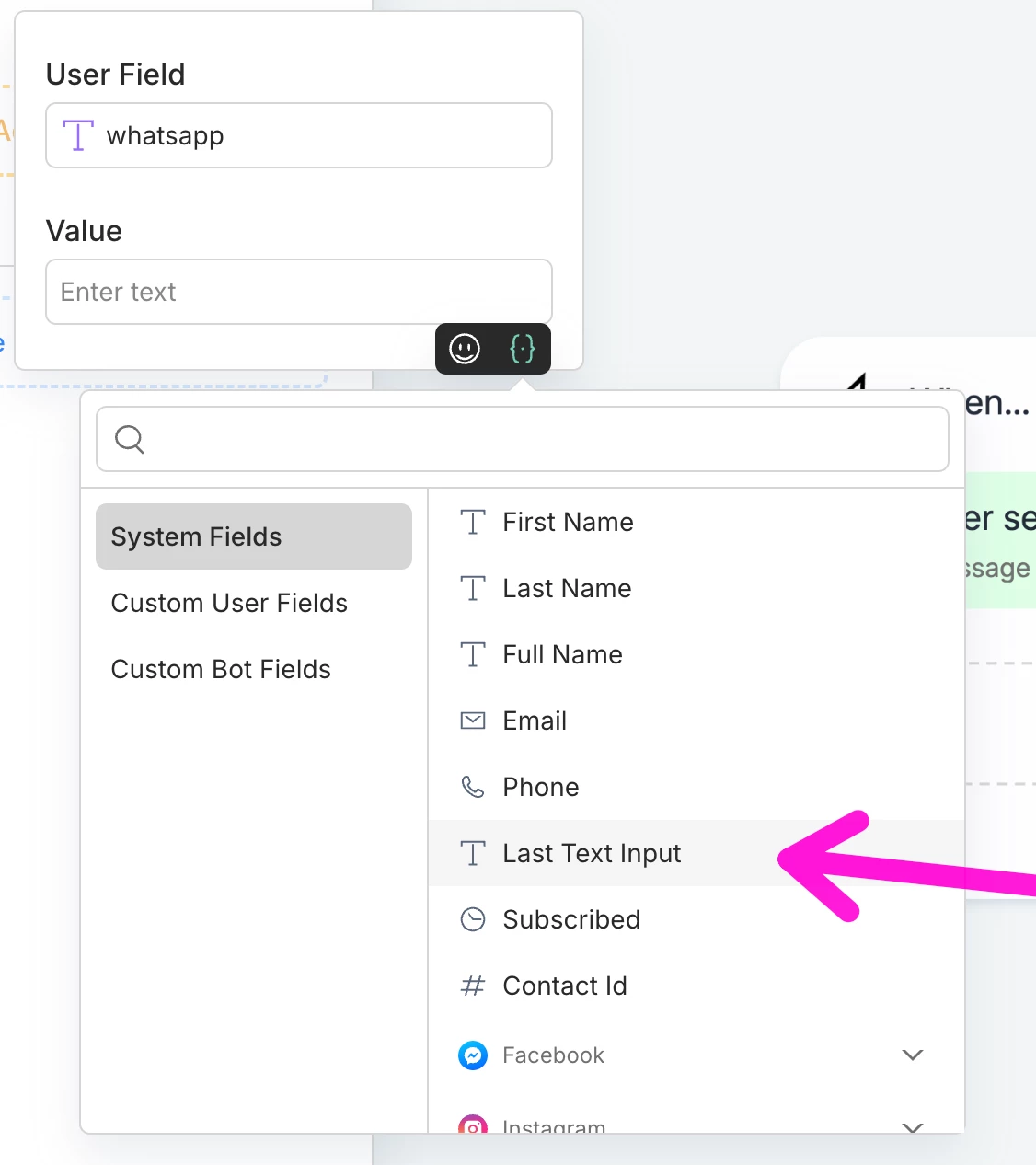
There’s a ‘Last Text Input’ system field that you can use to capture what the person wrote.

If that has a URL in it, then it’s either an image, audio or video ;)


Devtrest
  • Up-and-Comer
  • March 11, 2026

Yes, you can get pretty close to that, but the tricky part is that Manychat is much better with clear input types than with fully open-ended conversational branching.

So the cleanest no-button version is usually:

  • send a message asking them to upload a photo

  • use User Input to wait for the reply

  • if the reply is an image, send the confirmation message and assign the convo to you

  • if the reply is text, just assign the convo to you or send a different message

  • if they don’t reply, add a delay + tag/follow-up path

The hard part is the “image vs text vs no reply” split. That usually depends on how your User Input step is configured and what fallback you build around it.

So yes, it’s possible without buttons, but it may need:

  • one input step for the reply

  • conditions based on what they sent

  • a separate timeout/follow-up path

If your admin/dev only got it working with quick replies, it’s probably because that method is more controlled, not because your idea is wrong. The conversational version is possible, just a bit more fragile to set up.


MoonlitPMU
  • Author
  • Up-and-Comer
  • March 11, 2026

@Gustavo Boregio 

i dont have “Last Text Input” as a system field but it looks like an admin/dev (I’ve had 3 in my MC lol) did create a user field for something similar


@Devtrest when you say “User Input”  do you mean Data Collection?


Gustavo Boregio
Forum|alt.badge.img+7
  • Community Moderator & Expert
  • March 12, 2026

@MoonlitPMU it’s this one ;)


MoonlitPMU
  • Author
  • Up-and-Comer
  • March 13, 2026

@Gustavo Boregio I literally dont have that 🙃 not sure how


Gustavo Boregio
Forum|alt.badge.img+7
  • Community Moderator & Expert
  • March 13, 2026

@MoonlitPMU so you can’t use this field in a condition directly, you first need to assign it to a User Field in an action, and then check the User Field.

Try this same thing in an Action step like I showed on my screenshot ;)


Devtrest
  • Up-and-Comer
  • March 13, 2026

Yes, you can get pretty close to that, but the hard part is the image vs text vs no reply split without using buttons.

The cleanest setup would be:

  • ask them to send the photo in a normal message

  • use User Input to wait for the next reply

  • if they send a photo, send a confirmation message and assign the convo to you

  • if they send text, just assign the convo to you or send a different reply

  • if they don’t reply, add a delay and then tag them or trigger a follow-up

So it is possible without quick replies, but it usually takes a bit more setup and can be less reliable than the button version. The idea is right it just depends on how well Manychat catches the reply type.


MoonlitPMU
  • Author
  • Up-and-Comer
  • March 13, 2026

@Gustavo Boregio okkkk i had no idea what the {.} was and it took me like 10 min looking at your screenshot to realize thats what was selected. that worked, awesome, ty


@Devtrest sorry but the available steps i see dont seem to line up with what you sent at all. I have autism so im extremely literal, and so if I receive steps that arent exact, I’ll never figure it out 😅


when i create a message reply, theres no “user input,” so i assume when people say that here they mean “data collection”, but that options requires that i enter a question, so what is the purpose of having the “normal message” before that? Is there a user input that doesnt require a question that im not seeing?


When i select data collection, then i have to select image or text


I dont have the ability to do a condition following their input, just save response to user fields on input and then an action, so im not sure how to do “if they send a photo” or “if they send a text” there


when you say “if they dont reply add a delay” do you mean use the “if contact has not responded” or use a next step with a “delay”?

i got it to work, but im trying to recreate your steps so i know other ways to solve things going forward