Hi ManyChat Support,
I'm having an issue with my Facebook channel connection in ManyChat. It appears to be connected to my “personal Facebook profile???” https://www.facebook.com/profile.php?id=100071878564523 (2 followers) rather than my actual business Facebook Page https://www.facebook.com/lukedorazfitness (101 followers, Page name: Luke Doraz / @lukedoraz).
Here is the issue in detail:
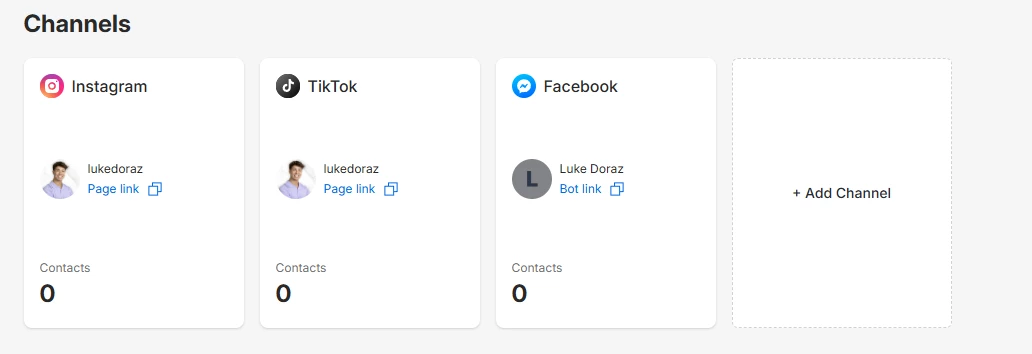
— My Instagram (@lukedoraz) and TikTok (@lukedoraz) channels are connected correctly in ManyChat, showing my proper profile picture and page links.
— My Facebook channel, however, is only showing a "Bot link" instead of a "Page link" like the other channels, and it is displaying a default gray avatar (no profile picture), which indicates it is pulling from what i beleive to be my personal Facebook account??? I think think if i’m not mistaken this was required to create a professional facebook page and is tied to my profession business account...
— So I My business Facebook Page is linked to my “personal Facebook accoun”t, as required by Meta. I believe ManyChat may have grabbed the personal profile during the connection process rather than the actual business Page.
— Because of this, keyword triggers and DM automations set up in ManyChat will not fire correctly for my business Facebook Page, which is where my audience and activity are.
What I need:
I need the Facebook channel in ManyChat disconnected from my personal profile and properly reconnected to my business Facebook Page (@lukedoraz) so that automations trigger correctly for comments and DMs on that Page.
Steps I have already taken:
— Verified that my business Facebook Page is added to Meta Business Suite
— Confirmed my Instagram is linked to the correct business Page inside Meta
— Attempted to review channel settings in ManyChat but do not see an option to switch which Facebook Page is connected
Please advise on how to fix this and get my professional Facebook Page connected. Happy to provide any additional account details needed.
Thank you,
Luke Doraz