
Solved

Send as Comment Reply

  • April 8, 2026
  • 1 comment
  • 14 views

cheriscards

I have been attempting for so many hours (with help from the AI feature and little to no help from the “human” the AI sends my way) to turn on the facebook comment to messenger.

The tutorial clearly shows that I need to set the first as a comment reply.

I can not get that option no matter what I do.

I have started over, I have not clicked any other links or added buttons.

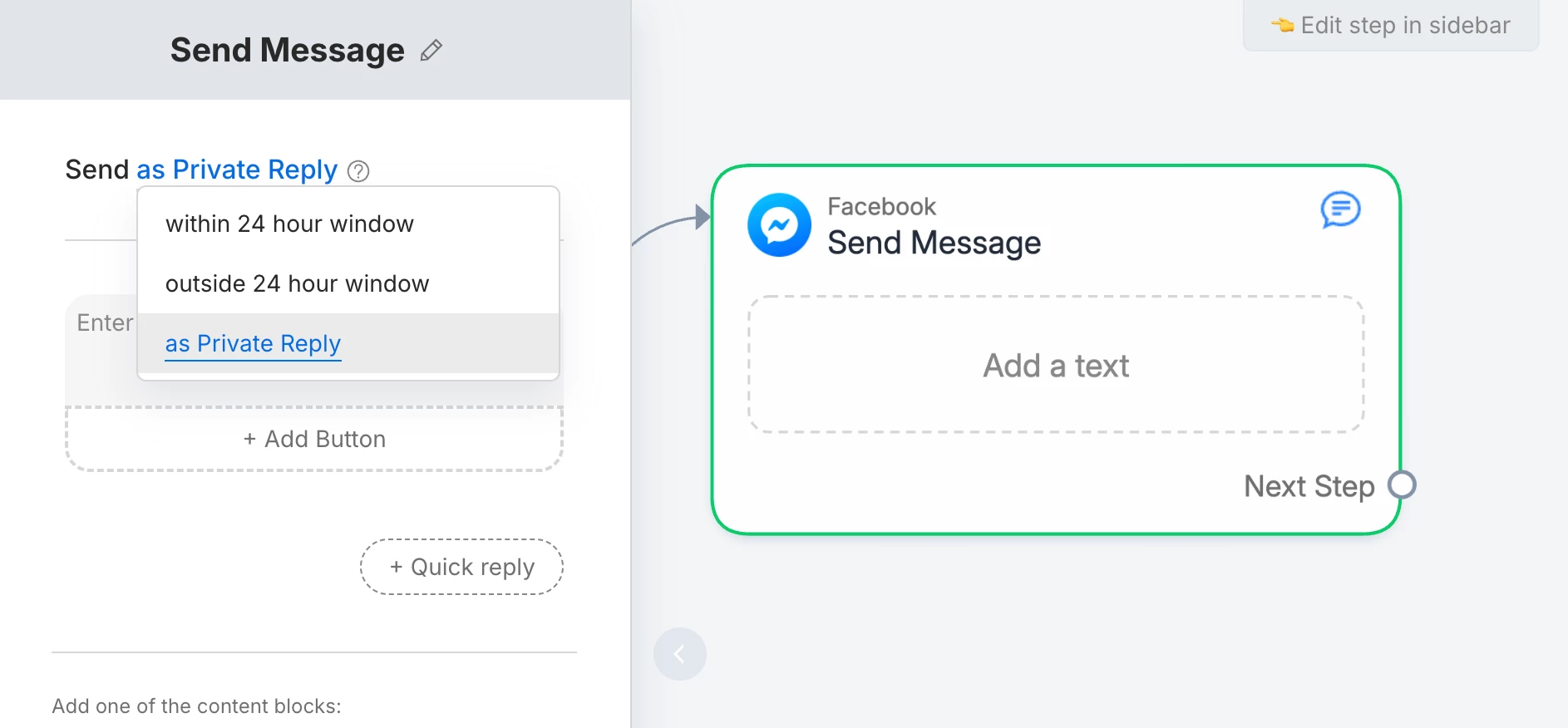
The top of my message node only has the 24 - private options.

Please help.
Best answer by rodrigo_silvano

Hey, ​@cheriscards 

When you select the first block, you should set to “as private reply” to be able to open the 24-hour window.

The options “as comment reply” was changed to “as private reply”. 


1 reply

rodrigo_silvano
Forum|alt.badge.img+4
  • Community Moderator
  • Answer
  • April 12, 2026

Hey, ​@cheriscards 

When you select the first block, you should set to “as private reply” to be able to open the 24-hour window.

The options “as comment reply” was changed to “as private reply”.