Question

Setup Uncertainity

  • March 11, 2026
  • 43 comments
  • 232 views

Bar Bits

Hello… 
Total newbie to ManyChat. I am using the free trial for now with plans to upgrade to Pro once I understand how to do certain tasks. Here is what I need help with and have no idea how to set this up. 

On particular IG posts, in the description, I will be asking users to Comment “Wine” in order to receive a Free PDF guide. In addition, I will be telling them to follow me on Instagram first, so I can DM them.  IG won't deliver the DM if they are not  following. Once the users follow my page, ManyChat will automatically respond to these comments with a line that says something like, “Sending over my Free Guide now. Please check your DM”

ManyChat will then send a DM to each of these users….

Thanks for requesting the free PDF guide! (the PDF guide will be attached)
 I would then take over, and personally DM the next day with an upsell to receive the full PDF guide. 

What is the proper way to set this up? 

Thanks, Steve 



43 replies

SumGeniusAI
  • Message Musketeer
  • March 11, 2026

Hey Steve, welcome! Here's how to set this up step by step:

1. Create the automation

Go to Automations tab → + New Automation. You can either click "Auto-DM links from comments" in the Start Here section, or start from scratch and select the Post/Reel Comments trigger. Choose the specific IG post where you're asking people to comment "Wine."


2. Set the keyword trigger In the trigger settings, add "Wine" as the keyword. Add variations too "wine", "WINE", "Wine!" — so you catch everyone regardless of casing.


3. Public comment reply

Add a Reply to Comment action, this is the public response like "Sending over my Free Guide now. Check your DM!" Important: add 4-5 different variations of this reply. ManyChat will rotate them so Instagram doesn't flag you for posting the same comment repeatedly.


4. DM with the PDF

Add a Send Message (DM) action in the same flow. ManyChat recently added native PDF attachment support for Instagram, so you can attach the PDF directly in the DM. Alternatively you can host it on Google Drive/Dropbox and send the link, both work.


5. The follower requirement

You're right that IG has DM restrictions for non-followers. ManyChat has a built-in option for this, in the Quick Automation settings you can require the user to follow you before the DM gets sent. If they haven't followed yet, ManyChat will prompt them to follow first before delivering the guide. So your CTA telling them to follow is exactly the right move.


6. Next-day upsell

For now, doing this manually is actually better for conversions when you're starting out. If you want to automate it later (Pro plan), you can add a Smart Delay in the flow. BUT important caveat: Instagram has a 24-hour messaging window, a Smart Delay does NOT reopen that window. So if you set a 24-hour delay, the message may not deliver unless the person interacts with you again within that window. One workaround: in your initial DM, add a button they have to tap to get the guide, that interaction opens the 24-hour window from the point of tap, giving your follow-up more time to land.

Hope that helps!


Joren Wouters
Forum|alt.badge.img+7
  • Manychat Community Expert
  • March 12, 2026

@Bar Bits Best way of setting this up is by asking someone’s email before you send the PDF. That way you build your own audience (an email list). Here’s how you can do that:


Bar Bits
  • Author
  • Rising Conversationalist
  • March 12, 2026

Hello Joren…. thanks for the video. Easy to understand. I do have two questions. 
In the initial stage when a user comments (a specific word), it triggers a message to ask permission to DM them a free guide. However, if the user doesn't follow me on IG, it won't allow me to DM them. So shouldn’t  I ask the user to follow me first. 


Second, when the first DM is sent,  you are asking for their first name, and then in a second DM, you are asking for an email address. Cant I ask for the first name and email address in one DM rather than creating an extra step? 

Thanks, Steve 


Joren Wouters
Forum|alt.badge.img+7
  • Manychat Community Expert
  • March 12, 2026

@Bar Bits To answer your questions:
1. If the user doesn’t follow you, you can still send the message. That’s not a problem. But what can happen is that it appears in the “Requests” folder. So you need to tell your users in the Public Reply (comment in the comment section) that they also need to look in the requests folder.
2. Nope, you need to ask in two


Bar Bits
  • Author
  • Rising Conversationalist
  • March 13, 2026

Hey Joren…. 

I watched your video again and there is one part I have a question on. 
When I set up the trigger and select Instagram - User Comments on Post or Reel, up comes a window that asks Which Post or Reel do you want to use in the automation? Am I going to see all the posts or reels that are currently on my IG page, or the posts or reels I have on my computer that I plan on uploading to IG? 
I ask this question because I have created about 15 different reels - over a month span, I plan on uploading a new reel every other day. Reels that are specifically promoting my ebook. I dont want to put them all up at once. 

Right now, on my IG page  there are about 20 different random posts that have nothing to do with the ebook, and there is no need to set up a ManyChart sequence for them. So when I see all the posts in that window, I assume I ignore all the random posts, and upload just the one pertaining to the ebook? And 2 days later, I upload the next reel/posts and so on?

Not sure if this makes any sense, but please get back with me. 

Steve


Joren Wouters
Forum|alt.badge.img+7
  • Manychat Community Expert
  • March 13, 2026

@Bar Bits Why do you want to go with a specific post, why not just use All posts? Then you only have to set it up once.


Bar Bits
  • Author
  • Rising Conversationalist
  • March 13, 2026

I have about 20 posts uploaded from the past that have nothing to do with my ebook, so I dotn need them to be part of the ManyChat workflow. 


Joren Wouters
Forum|alt.badge.img+7
  • Manychat Community Expert
  • March 13, 2026

@Bar Bits But if they don’t have anything to do with the ebook, you’re also not asking to comment a specific word, right? So then it doesn’t matter at all, I think?


Bar Bits
  • Author
  • Rising Conversationalist
  • March 13, 2026

In regards to the 15 reels I created specifically for my ebook, I prefer to upload them every other day so users will see a new one every other day rather than seeing them all at once. 


Joren Wouters
Forum|alt.badge.img+7
  • Manychat Community Expert
  • March 13, 2026

@Bar Bits And do you ask people to comment a specific word, like “EBOOK” or “GUIDE”?


Bar Bits
  • Author
  • Rising Conversationalist
  • March 13, 2026

On the 15 reels I am uploading every other day, yes, I will be asking users to comment a word


Joren Wouters
Forum|alt.badge.img+7
  • Manychat Community Expert
  • March 13, 2026

Then just set the trigger to All posts and the word to reply to to the keyword that you promote in your Reels.


Bar Bits
  • Author
  • Rising Conversationalist
  • March 13, 2026

Ok, if I set up for all posts, I assume I need to upload the 15 all at once that I created for the ebook? 


Bar Bits
  • Author
  • Rising Conversationalist
  • March 13, 2026

Or can I set a time or date for each post to launch? 


Joren Wouters
Forum|alt.badge.img+7
  • Manychat Community Expert
  • March 13, 2026

@Bar Bits No, it doesn’t matter when you upload them. It just means that the automation works for all posts and only triggers when somebody comments with your specific keyword.

You cannot schedule posts via Manychat, you can do that in FB Business Manager.


Bar Bits
  • Author
  • Rising Conversationalist
  • March 13, 2026

Yes, but users will see them all at once, regardless if they click on them or not.


rodrigo_silvano
Forum|alt.badge.img+4

Hey, ​@Bar Bits 

Welcome to Manychat 🙌🏼

As ​@Joren Wouters said on his previous messages, you don’t need to create a new trigger/automation every time you publish a reel/post. Using the option “all posts/reels” means that your automation can be activated on all of your content.

The “secret” is to inform the users to comment the keyword only on the posts/reels you want.

Example:

Post 1 - without informing a keyword
Post 2 - with keyword
Post 3 - with keyword
Post 4 - without informing a keyword

If you choose the option “all post/reels”, your automation will work with those 4 posts, but the user was informed only on the posts 2 and 3, so most likely the user won’t comment any keyword on the posts 1 and 4.

Regarding the question about delivering your e-book only for followers, and for the automation to work properly, it must follow these requirements:

[trigger] → [first message with text and button and set to “private reply”] → [condition to verify if the user follows you] → depending on the condition you deliver the e-book.


Here are some articles about your questions:

24-hour window → https://help.manychat.com/hc/en-us/articles/14281199732892-How-to-send-messages-outside-the-24-hour-and-7-day-windows-in-Messenger-and-Instagram

Instagram Post and Reel Comments trigger → https://help.manychat.com/hc/en-us/articles/14281316989724-Instagram-Post-and-Reel-Comments-trigger

Conditions → https://help.manychat.com/hc/en-us/articles/14281142518556-Condition-Block


Let us know if you have another questions! 🙂


Bar Bits
  • Author
  • Rising Conversationalist
  • March 13, 2026

Sorry if I seem totally confused, and I appreciate the assistance. 
I understand everything you said - what I was talking about was delivery. Rather than uploading all my reels and deciding on which ones have the automation trigger by the “word” in the comments , wouldn’t it better to stagger the delivery of the reels, so users see a new one every other day?


rodrigo_silvano
Forum|alt.badge.img+4

@Bar Bits If you set the automation mentioned before, you can upload your reels whenever you want. You can post 1 today, another one after 1 week, and all of them will trigger the automation if the user comments the keyword you’ve set.


Bar Bits
  • Author
  • Rising Conversationalist
  • March 16, 2026

Hello ​@Joren Wouters 
Regarding the automation discussion we had, you mentioned asking for people's first names and email addresses before sending them any freebies. Isn’t their first name on the DM, at the top of the messaging window? 
Thanks, Steve 


Joren Wouters
Forum|alt.badge.img+7
  • Manychat Community Expert
  • March 16, 2026

@Bar Bits Yes, it’s there. But often people have wrong Instagram names or funny names (not their actual name) in their profile. So that’s why I recommend asking it.


Bar Bits
  • Author
  • Rising Conversationalist
  • March 17, 2026

I create an automation for my IG posts/reels that triggers when someone comments a specific word. 
Now I am curious if I can apply the same automation or create a second type to work for FB posts? Or if I am only allowed to create on automation for one social media platform? 


Bar Bits
  • Author
  • Rising Conversationalist
  • March 19, 2026

Can I apply the same automation workflow to posts on FB - or this only applicable with IG? 


rodrigo_silvano
Forum|alt.badge.img+4

Yes, you can ​@Bar Bits!
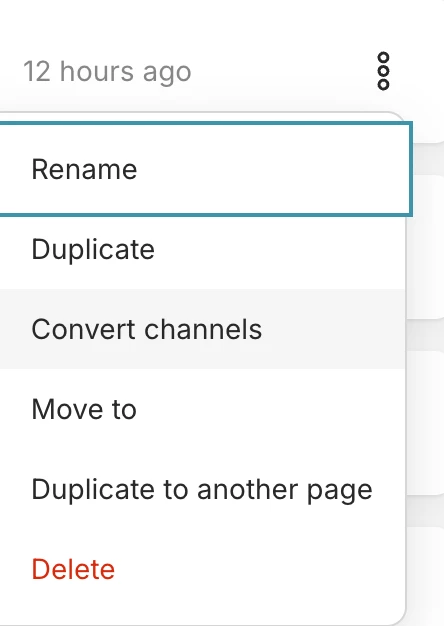
To do so, click on the 3 dots and select convert channels


Then, select the Facebook channel. Open the new automation flow and check if everything is correct.
Choose the trigger, and then you have a new automation set to FB! 🙂


Bar Bits
  • Author
  • Rising Conversationalist
  • March 20, 2026

Ok great. I assume I can switch back n forth to make changes, etc.,..?