Solved

Urgent: The message can't reply...

  • June 15, 2026
  • 4 comments
  • 26 views

Ela0805

Recently, I can’t reply the message anymore, the premission change it as “Admin”, and I do refresh the premisson but it shows “You have insufficient rights to chat with the contact. Please reach out to one of the page administrators.”…. Do you have experience it? How I can solve it as well? Ready needs help, thanks a lot!

Best answer by Gustavo Boregio

@Ela0805 go to settings > team members, look for your profile, and make sure the "Inbox seat" option is toggled for your profile:


Then go back to the Live Chat and refresh the screen.

This should do the trick!

4 replies

Gustavo Boregio
Forum|alt.badge.img+7
  • Community Moderator & Expert
  • Answer
  • June 15, 2026

@Ela0805 go to settings > team members, look for your profile, and make sure the "Inbox seat" option is toggled for your profile:


Then go back to the Live Chat and refresh the screen.

This should do the trick!


Ela0805
  • Author
  • Up-and-comer
  • June 16, 2026

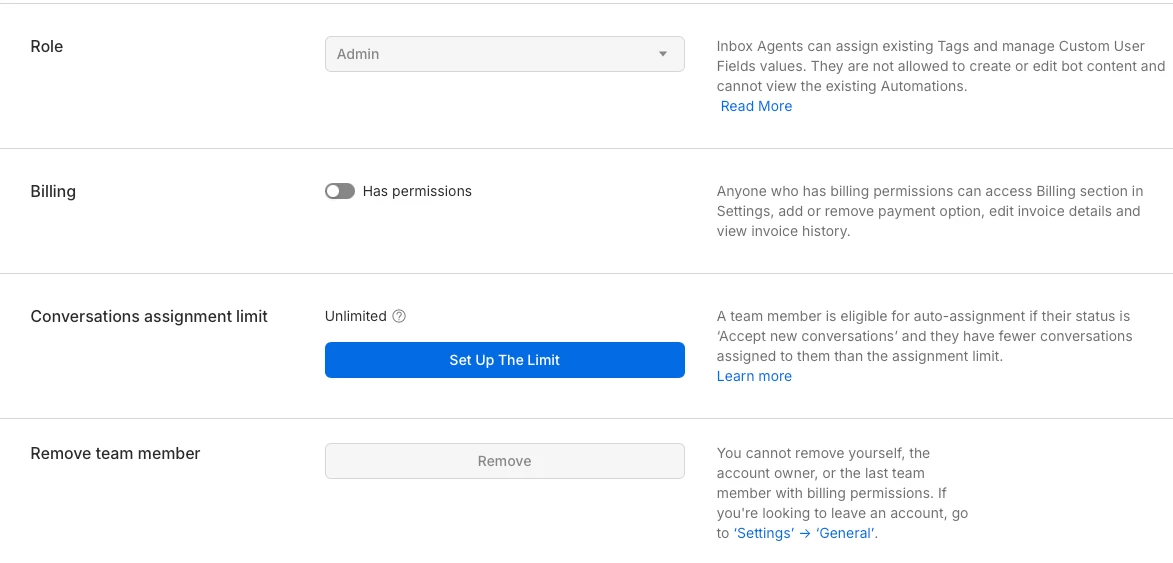
Hi @Gustavo Boregio, Thanks for reply the message but when I click to the >team member page, it does not show what the same that you are showing to me...my page is like that...


Gustavo Boregio
Forum|alt.badge.img+7
  • Community Moderator & Expert
  • June 16, 2026

Check the ‘Billing’ toggle first.

Then refresh the page.

Then you’ll see the Seat Type toggle ;)


Ela0805
  • Author
  • Up-and-comer
  • June 17, 2026

Oh.. got it and I can reply the message! thanks!:)