Question

whatsapp restriction after using manychat

  • February 28, 2026
  • 5 comments
  • 12 views

dr.mohammadalmashaqbh

hi i started using manychat automation for whatsapp dm keyword reply for 10 days...but i got restricted does that have any thing to do with manychat...and how to know if using manychat dm keyword reply could get me restricted or banned another time?


5 replies

rodrigo_silvano
Forum|alt.badge.img+4

Hey ​@dr.mohammadalmashaqbh 

Manychat is a Meta official partner (check it here: https://help.manychat.com/hc/en-us/articles/18624810395932-Is-Manychat-officially-approved-by-Meta), so it is hard to believe that using Manychat can hurt your account.
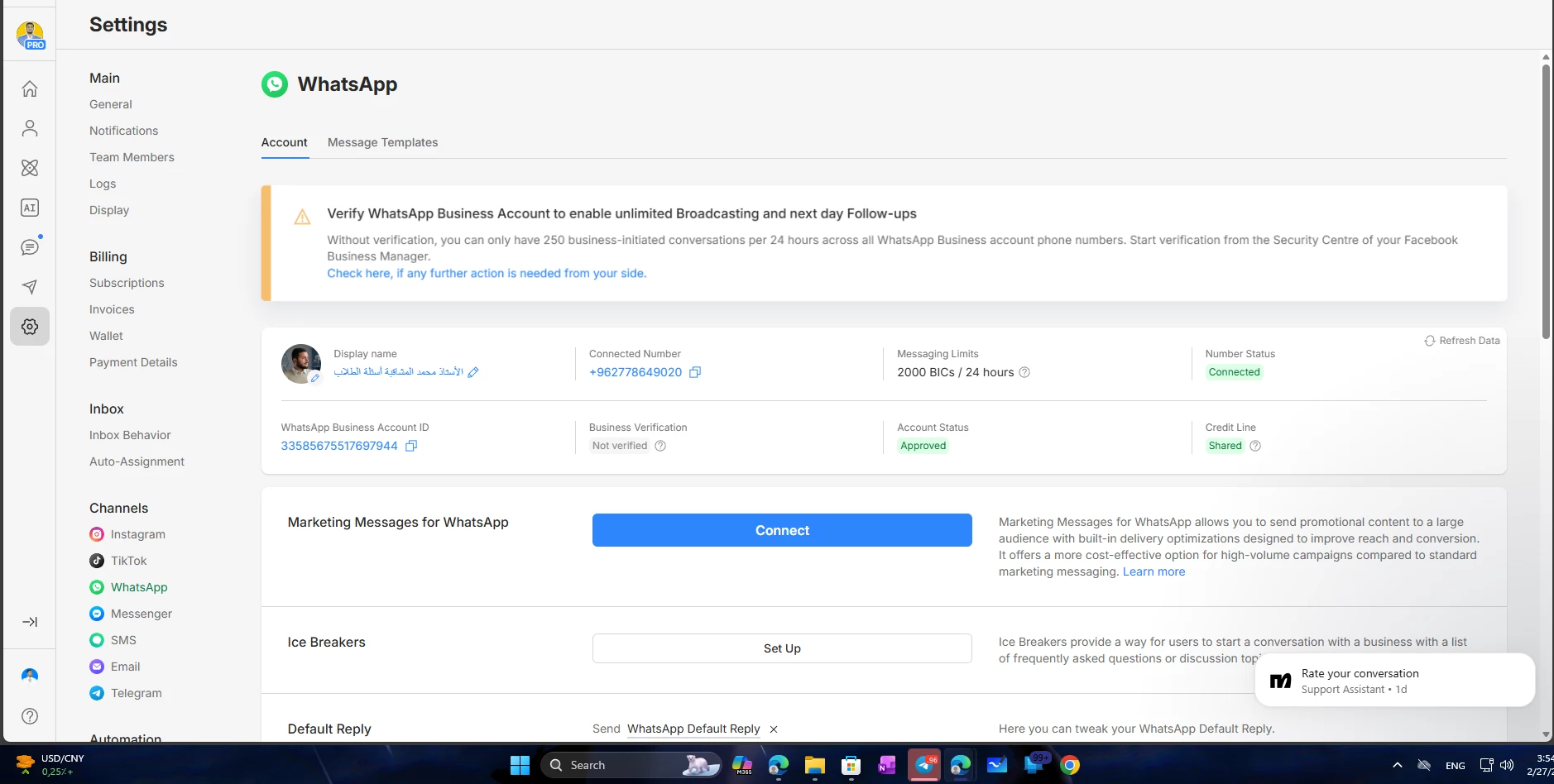
Based on the banner in your image, you’ll need to verify your business on Meta side to be able to get more than 250 message per 24 hours.

You can start the validation on WhatsApp Manager.

Let me knoe if you have further questions! 🙂


dr.mohammadalmashaqbh

@rodrigo_silvano thx bro but when i asked for the reason it seems that whats app detected high message volume from my account so they mark me as a spam is there any way to use it safely i really dont want to lose my whatsaap account all my bussinsess and work is based on it


rodrigo_silvano
Forum|alt.badge.img+4

For safety purposes, you should send messages gradually to your contacts. That way, Meta can evaluate your “relationship” with those numbers.

Note that is a high volume of numbers report your number as a spam, Meta can restrict or even deactivate your number.

Before sending messages, always check if you got approval from the person you’re sending.

If you validate your business and send message only to those are expecting them, you should have no problems! 🙌🏼


dr.mohammadalmashaqbh

@rodrigo_silvano i never sends message i only let the dm word automation works only...never uses manychat to send any message to out 24 h rule … as i said only trigerring dm keyword


rodrigo_silvano
Forum|alt.badge.img+4

Based on your image, the only thing that you didn’t did was the business verification. 

However, if you’re saying that your account is restricted by Meta (probably you’re seeing that information on WhatsApp Manager), your best shot is to request a review, and Meta will check your account.

Follow these steps:
Go to: Business Manager → WhatsApp Accounts → WABA → WhatsApp Manager 
Then, go to Phone numbers → View details in Business support home → click on Request review

Meta typically completes reviews within 48 hours, and their response will be sent directly to your email with a final decision.