



We’ve rolled out some improvements to make building automations and managing conversations on mobile faster, clearer, and more organized than ever.
Here’s what’s new 👇
🏠 A Smarter, More Compact Home Screen
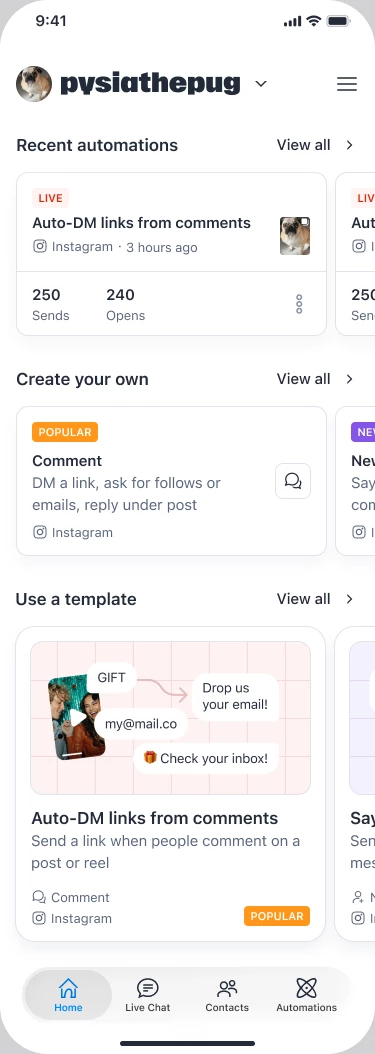
Everything essential, right where you need it.
The new Home tab is designed to help you take action faster:
- Your recent automations are now displayed at the top.
- Most popular triggers come next, so you can quickly start building and creating your own automations.
- Need inspiration? Top templates are right below, ready to customize
Triggers and templates are now displayed in easy-to-browse carousels, and each section includes a “View all” button that takes you directly to the corresponding section in the ‘New Automation’ screen.
Less searching. More building.
A Clearer “New Automation” Experience
We’ve separated automation creation into two clear paths:
🔹 Create your own automation
In the ‘Create your own tab’, you’ll find:
- The most popular triggers at the top
- Triggers you can publish once and let run automatically forever
Perfect if you want full control and flexibility.
🔹 Use a Ready-Made Template
In the ‘Templates’ tab, you’ll discover pre-built automation structures designed for real business goals, like:
- Promoting a course
- Booking appointments via DMs
- Requesting reviews in Stories
You simply customize the wording and the structure is already built for you.
From idea to live automation in seconds.
💬 Livechat Is Now Inbox
Livechat has evolved into Inbox: a more powerful and organized way to manage your conversations.
Whether you’re replying personally to leads, handling customer support, or following up at the right time, Inbox helps you stay focused and organized.
You can do this on the Web or Mobile, easy access and ready to jump in any conversation you need.
Key Benefits
- Focus on the right conversations: Use filters and labels to quickly surface DMs that need your attention.
-
Prioritize what hasn’t been handled: The Unread filter helps you instantly identify conversations that still require a reply.
- Follow up intentionally: Snooze conversations and return to them exactly when it’s the right time.
- Manage manual and automated chats together: Inbox gives you one place to handle both personal replies and automated conversations.
Key Features
- Labels — Create custom labels to organize conversations
- Filters — Filter by Unread, tags, or custom fields
- Unread filter — Quickly see what still needs attention
How to Use It
- Go to Inbox
- Use Filters to surface conversations that need attention
- Apply Labels to organize your chats
These updates are designed to help you:
✔ Build faster
✔ Stay organized
✔ Turn more leads into customers
Let us know what you think in the comments— we’d love your feedback 💙