New

New followers DM

Related product area:Templates
  • March 4, 2026
  • 3 comments
  • 13 views

Ruben.Montes

We need options to add more buttons. This way they can select what is closely related to why they followed and we can nudge them into different directions 

3 replies

Fabio Gaulke
Forum|alt.badge.img+3
  • Community Moderator
  • March 4, 2026

Hey, ​@Ruben.Montes!


If you build an Automation via the Classic flow builder, you can set it to be the automation to trigger for the new followers.


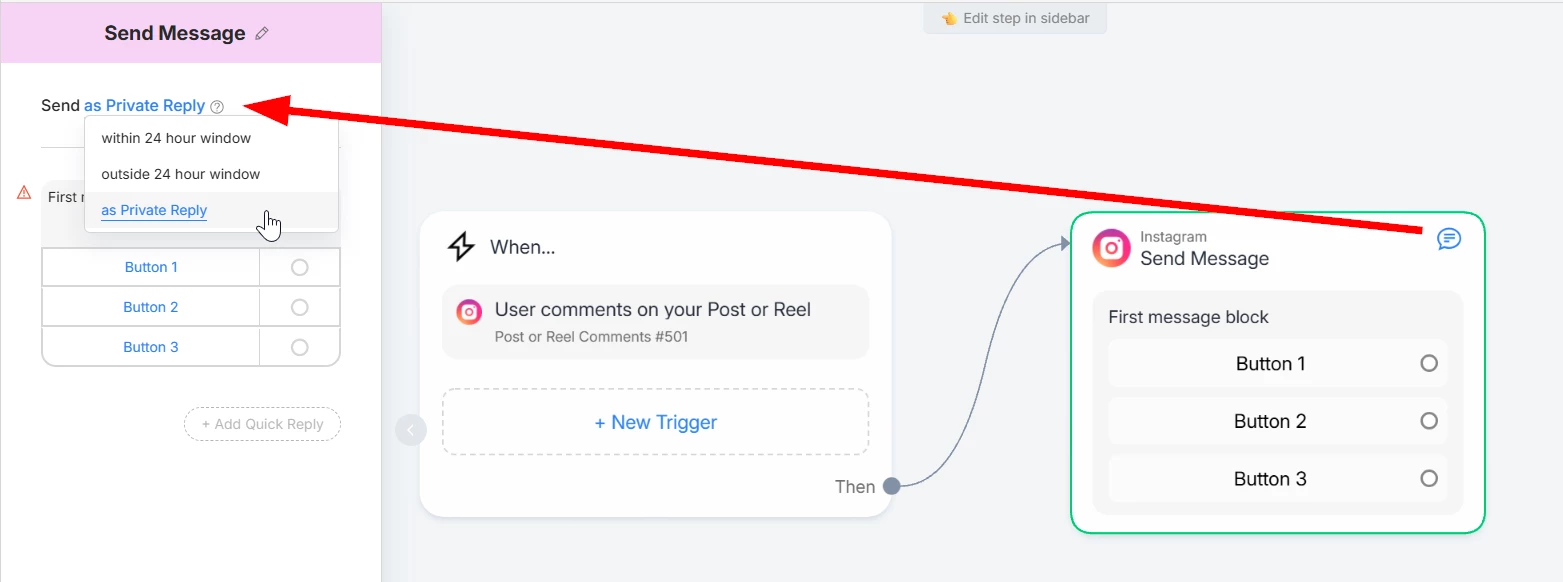
IMPORTANT: You need to set the first message block as Private Reply to work with this trigger.

There are 2 ways to do that:

  1. Insert a temporary Post Comment trigger to be able to change it
  2. Or build the automation, set it as reply to new followers and go back to it to change the first block as Private Reply.


That way you can have up to 3 buttons in the first message.


Ruben.Montes
  • Author
  • Up-and-Comer
  • March 4, 2026

It seems yours looks different than mine. I don’t get an option for “set up” or “select existing”


Fabio Gaulke
Forum|alt.badge.img+3
  • Community Moderator
  • March 4, 2026

It seems yours looks different than mine. I don’t get an option for “set up” or “select existing”


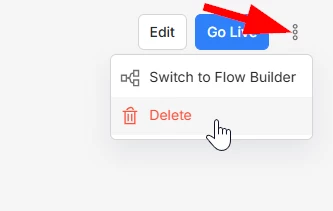
Ok… that's probably because you already have an automation created in the “quick way”. If that is the case, it only shows an Edit button (even if you stop the automation):


To get the options back, you'll need to delete the actual automation:

You can also select the option "Switch to Flow Builder” and tweak it as you wish.

With that done, the “select existing” button should appear again.